[V5.4-001] GT.M Database Encryption Technical Bulletin
GT.M Database Encryption Technical Bulletin
Copyright © 2010 Fidelity Information Services, Inc. All Rights Reserved.
Permission is granted to copy, distribute and/or modify this document under the terms of the GNU Free Documentation License, Version 1.3 or any later version published by the Free Software Foundation; with no Invariant Sections, no Front-Cover Texts and no Back-Cover Texts.
GT.M™ is a trademark of Fidelity Information Services, Inc. Other trademarks are the property of their respective owners.
This document contains a description of GT.M and the operating instructions pertaining to the various functions that comprise the system. This document does not contain any commitment of FIS. FIS believes the information in this publication is accurate as of its publication date; such information is subject to change without notice. FIS is not responsible for any errors or defects.
Revision History
| Version | Date | Summary |
|---|---|---|
| 1.3 | October 25, 2010 | In Examples of use and under the Key Management example section, changed: helen$ $gtm_dist/plugin/gtmcrypt/encrypt_sign_db_key.sh {helen,phil}_cust_dat.txt phil phil@gt.m to helen$ $gtm_dist/plugin/gtmcrypt/encrypt_sign_db_key.sh helen_cust_dat.txt phil_cust_dat.txt phil@gt.m |
| 1.2 | July 6, 2010 | Added the Using the V5.4-001 Reference Implementation with Older Releases section. It includes the instructions for retrofitting the field test V5.4-001 version of the revised database encryption reference plugin to older GT.M versions. Updated to reflect the new shell scripts for the reference implementation released with GT.M V5.4-001, including support for Gnu Privacy Guard version 2. Reworked examples and added more diagrams. Miscellaneous cleanup of vocabulary and grammar. Since the documentation for the new scripts replaces that of the old, in the unlikely event that you wish to continue using the reference plugin from prior versions of GT.M with newer versions, and you are an FIS GT.M support customer, please contact GT.M support for a copy of the old technical bulletin. |
| 1.1 | April 14, 2010 | Changed ./Configure aix64-cc to ./Configure aix64-cc shared in the IBM AIX 5.3 (pSeries) section of Appendix - Building Encryption Libraries. |
| 1.0 | August 7, 2009 | First published version |
Contact Information
| GT.M Group FIS 2 West Liberty Boulevard, Suite 300 Malvern, Pennsylvania 19355 United States of America | GT.M Support for customers: +1 (610) 578-4226 / gtmsupport@fisglobal.com Switchboard: +1 (610) 296-8877 Website: http://fis-gtm.com |
Table of Contents
CRYPTKEYFETCHFAILED, Cannot obtain encryption key for ffff. xxxx
CRYPTNOMM, ffff is an encrypted database. Cannot support MM access method.
CRYPTNOPSWDINTP, Cannot prompt for password inside a TP transaction.
Cannot reset encryption hash in file header while ffff other processes are accessing the database
Environment variable gtm_dbkeys undefined. Cannot find /.gtm_dbkeys
Environment variable gtm_passwd set to empty string. Password prompting not allowed for utilities
Error parsing database key file. At line : No matching ‘dat’ entry found in
Error parsing database key file. At line : does not start with ‘dat’ / ‘key’
Error parsing database key file. At line : No matching ‘key’ entry found in
Using the V5.4-001 Reference Implementation with Older Releases
Introduction
Overview
Effective V5.3-004, GT.M on selected platforms can encrypt data in database and journal files. Encryption protects data at rest (DAR), that is it protects against unauthorized access to data by an unauthorized process that is able to access disk files.
A plug-in architecture allows you to use your choice of encryption package. The characteristics of encryption are entirely determined by the package you choose – for example, GT.M implements no “back doors” or “key recovery”, and if you want such functionality, you need to choose or construct an encryption package that provides the features you want.
FIS distributes the source and object code for the reference implementation of a plug-in that uses popular, widely available, encryption libraries. If the reference implementation plug-in meets your needs, you are welcome to use it as distributed, but please read and understand the Disclaimer, below. You can also use it as a base to implement your own plug-in.
In the reference implementation, GT.M uses a symmetric cipher to encrypt data. The reference implementation encrypts the key for the symmetric cipher with an asymmetric cipher using public and private keys. The private keys are stored in a key ring on disk locked with a password (or passphrase – the terms are used interchangeably).
Disclaimer
Database encryption is only useful as one component of a comprehensive security plan and is insufficient as the sole means of securing data. The use of database encryption should follow from a good security plan. This document describes implementing encrypted GT.M databases; it does not discuss security plans.
Proper security protocol never places an unencrypted password, even in obfuscated form and/or in an obscure location, on disk. With GT.M database encryption, unencrypted passwords exist in the address space of processes accessing the database, which means that unencrypted passwords can theoretically be written to swap files when process memory is paged out. To be secure, an installation must handle this by means such as: using encrypted swap devices or files, ensuring that GT.M processes are not paged out, or some other means to ensure that information in swap files is available only to the running process. In other words, even with respect to encryption, GT.M database encryption is only part of a complete security infrastructure.
Our expertise is in GT.M, not in encryption. Encryption needs vary. Furthermore, the use of encryption may be restricted – or required – by regulations applicable to your location and circumstances. Therefore, our approach is to create a plug-in architecture where you can choose your preferred encryption software. In the course of development, we tested it primarily with GNU Privacy Guard, the widely available implementation of Pretty Good Privacy (see “PGP: Pretty Good Privacy” by Simson Garfinkel). Ensure that you have confidence in (and confidence in the support for) whichever encryption software you choose, because failure of the encryption software is likely to leave your data unrecoverable. GT.M itself performs no encryption, and encryption is performed exclusively by software that you install and configure. FIS neither endorses nor supports any specific encryption algorithm or library.
Furthermore, just as GT.M allows for the use of your choice of encryption libraries, encryption libraries in turn require keys that must be managed. In its simplest form, key management requires both that only those who need a key have that key, and also that keys are not lost. Key management is two steps removed from GT.M’s implementation of database encryption, but is important to the successful use of encrypted databases. It must be part of your operations policies and procedures. FIS strongly recommends that you understand in detail how to implement the infrastructure for whichever specific encryption you choose.
Limitations of GT.M Database Encryption
Elements of your security infrastructure and management processes outside of GT.M database encryption need to manage issues discussed in the following sections.
Data Not At Rest Not Protected
GT.M database encryption is designed to protect data at rest. Applications execute business logic to manipulate and produce unencrypted data. Unencrypted data must exist within application processes, and can be accessed by any process with access rights to the virtual address space of a process containing unencrypted data. Also, data in transit between systems and between processes is not protected by GT.M database encryption.
- Before creating a core dump, GT.M attempts to clear any keys that it is aware of within the process address space. The reference implementation also uses the encryption libraries so as to minimize the probability of keys appearing in core dumps. Since it is not possible to guarantee that keys will not appear in a process core dump, depending on your security policy, FIS recommends that you consider whether to disable the creation of core dumps by GT.M processes accessing encrypted databases, or use other means to limit access to core dumps. Note also that the use of random byte sequences as keys makes it harder to discern them in a core dump.1
Keys in the Process Address Space / Environment
This is a corollary of the fact that data not at rest is not protected by GT.M database encryption.
In order to encrypt and decrypt databases, keys must exist in the address space / environment of GT.M processes. Furthermore, with the reference implementation, processes also need to have access to the user’s private key, and to get access to the private key, they need access to the passphrase of the user’s GPG keyring. In order to pass encryption to child processes, the passphrase also exists in the process environment, even if obfuscated. This means that any process that can access the address space or environment of a GT.M process accessing encrypted databases has access to the passphrases and keys.
- If an application provides some or all users access to a shell prompt or a GT.M direct mode prompt, or allows that user to specify arbitrary code that can be XECUTE’d, those users can find ways to view and capture keys and passphrases. Note that, if a key or passphrase can be captured, it can be misused - for example, a captured GPG keyring passphrase is captured, it can be used to change the passphrase. You must therefore ensure that your application does not provide such access to users who should not view keys and passphrases.
- This limitation makes it all the more important that those who have access to shell prompts, GT.M direct mode prompts, etc. not leave sessions unlocked, even briefly, if it is at all possible for someone who should not have knowledge of keys and passphrases to access the sessions during that time.
Long Lived Keys
A database file has an extended life. In typical operation, only a minuscule fraction of the data within a database changes each day. As changing an encryption key requires re-encrypting all the data, this means encryption keys for files have long lives. Since long-lived keys are security risks – for example, they cannot be changed when an employee leaves – key management must therefore be part of the overall security plan. At a minimum, long lived keys require two stage key management – a database key with a long life, not normally accessed or viewed by a human, stored in a form encrypted by another key that can be changed more easily.
Furthermore, a key must be retained at least as long as any backup encrypted with that key; otherwise the backup becomes useless. You must have appropriate procedures to retain and manage old keys. Since successful data recovery requires both keys and algorithms, the retention processes must also preserve the encryption algorithm.
Voluminous Samples of Encrypted Data
Database and journal files are large (GB to hundreds of GB). This large volume makes database encryption more amenable to attack than a small encrypted message because having many samples of encrypted material makes it easier to break a key.
Encryption Algorithms Neither Endorsed Nor Supported by FIS
FIS neither endorses nor supports any specific encryption algorithm.
The selection of an encryption algorithm is determined by many factors, including but not limited to, organizational preferences, legal requirements, industry standards, computational performance, robustness, the availability of encryption hardware, etc. No algorithm meets all needs.
Therefore, GT.M provides a “plug-in” architecture for encryption algorithms, which allows you to integrate your preferred encryption software with GT.M. In the GT.M development environment, we created variations on a reference implementation using popular encryption packages for our validation. We tested each reference implementation variation on at least one computing platform, and one reference implementation variation on each computing platform. This document lists which encryption package we tested on which platform.
You take all responsibility for the selection and use of a specific encryption package. Please be aware that:
- All encryption libraries that run within the address space of a GT.M process must conform to the rules of any functions for GT.M, as documented, including but not limited to being single threaded, not altering GT.M’s signal handlers, restricting the use of timers to the API provided by GT.M, etc. 2
- Malfunction of encryption software or hardware can render your data irrecoverable. As part of your comprehensive organizational risk management strategy, please consider the use of logical multi-site application configurations, possibly with different encryption packages and certainly with different encryption keys.
- The cipher used for database encryption must not change the length of the encrypted sequence of bytes. In other words, if the cleartext string is n bytes, the encrypted string must also be n bytes.
No Key Recovery
The reference implementation of GT.M database encryption has no “back door” or other means to recover lost keys. We are also not aware of back doors in any of the packages used by the reference implementation.
Lost keys make your data indistinguishable from random ones and zeros. While FIS recommends implementing a documented key management process including techniques such as key escrow, ultimately, you take all responsibility for managing your keys.
Human Intervention Required
At some point in the process invocation chain, the reference implementation requires a human being to provide a password that is placed (in obfuscated form) in the process environment where child processes can inherit it. If you want to be able to access encrypted databases without any human interaction, you must modify the reference implementation, or create your own implementation.
For example, if you have a GT.M based application server process that is started by xinetd in response to an incoming connection request from a client, you may want to consider an approach where the client sends in a key that is used to extract an encrypted password for the master key ring from the local disk, obfuscates it, and places it in the environment of the server process started by xinetd. If the application protocol cannot be modified to allow the client to provide an additional password, xinetd can be started with the $gtm_passwd obfuscated password in its environment, and the xinetd passenv parameter used to pass $gtm_passwd from the xinetd process to the spawned server process.
MM Databases
GT.M database encryption is only supported for the Buffered Global (BG) access method. It is not supported for the Mapped Memory (MM) access method. See Alternatives to Database Encryption, below, for other options.
Alternatives to Database Encryption
On some platforms, you may be able to use disk drives with built-in encryption, or encrypted file systems to protect data at rest. These may or may not be as secure as GT.M database encryption: for example, once an encrypted file system is mounted, files thereon can be accessed by any process that has appropriate permissions; with GT.M database encryption each process accessing a database file must individually have access to the keys for that database file.
Device IO
The built-in interface to encryption is implemented only for data in database, journal, backup and certain formats of extract files. To encrypt IO (say for sequential disk files), you can use IO to PIPE devices. Alternatively, you can call encryption routines from GT.M using the external call interface.
Replication and GT.CM
GT.M encrypts neither the replication stream nor GT.CM (GNP/OMI) network traffic. When needed, there are excellent third party products for implementing secure TCP/IP connections: software solutions as well as hardware solutions such as encrypting routers.
As with any GT.M process that accesses databases, the Update Process, helper processes and GT.CM server all require provisioning with keys to enable their access to encrypted databases.
When a GT.CM server has a key for an encrypted database, any client connecting to the server can access encrypted records in that database.
Theory of Operation
This section describes the operation of GT.M database encryption with the reference implementation. A subsequent section describes the functions of the reference implementation which can be reworked or rewritten to use different encryption packages.
Definition of Terms
| Terms | Description |
|---|---|
| Cipher | An encryption algorithm or the implementation of an encryption algorithm, for example, the symmetric cipher AES 256 CFB. |
| Hash (or Fingerprint) | A signature algorithmically derived from an object which is certain to a very impressive probability that uniquely identifies an object within a set of similar objects. |
| Key length | The number of bits comprising a key. Longer key lengths may result in stronger encryption (more difficult to break) but require more computation. |
| Key management | The generation, distribution, and access of keys. The reference implementation of database encryption uses: * symmetric keys to encrypt data and index records. * public keys to encrypt symmetric keys (so they can be placed on disk). * private keys to decrypt symmetric keys. * passwords to encrypt private keys (so they can be placed on disk). |
| Master key file | This file contains pairs of entries indicating which symmetric key is used to encrypt/decrypt database records. Database records can be found in database, journal, extract and backup files. |
| Obfuscation | A technique used to make data difficult to discern on casual observation. A common example is “pig Latin”. Since the password used for the GPG keyring exists in the process’ environment with the reference implementation, GT.M obfuscates it to reduce the chance that visual access to process information (say during debugging) inadvertently exposes the password. |
| Password (or Passphrase) | A secret word or phrase used in the reference implementation to protect a private key on disk (a password should never be on disk in the clear, which is the electronic equivalent of taping it to your monitor with a sticky note). |
| Public key / Private key (or Asymmetric keys) | A pair of keys used so what one key encrypts the other can decrypt. The private key is sometimes referred to as the “secret” key (because it is not shared as opposed to the public key which is; the private key should never be on disk in the clear). In the reference implementation, asymmetric keys are used to encrypt the symmetric database key. This allows a master to encrypt a symmetric database key with a user’s public key (so only the user can decrypt it with their private key). Encryption using a public key / private key pair is referred to as “public key encryption”. The reference implementation uses GNU Privacy Guard with associated libraries libgpgme and libgpg-error for asymmetric key encryption. |
| Symmetric key | The same key used to both encrypt and decrypt. Symmetric ciphers are faster than asymmetric ciphers. Encryption using a symmetric key is referred to as “symmetric key encryption”. Depending on the platform, the reference implementation uses either GNU Privacy Guard’s libgcrypt, or libcrypto from OpenSSL, for symmetric key encryption. |
Overview
Warning
GT.M implements database encryption with a plug-in architecture that allows for your choice of cipher. Any code statically or dynamically linked in to a GT.M process must meet the requirements of code used for external calls. The GT.M distribution includes a reference implementation that interfaces to several common packages and libraries. You are free to use the reference implementations as is, but remember that the choice of cipher and package is yours, and FIS neither recommends nor supports any specific package.
Note: In any given instance, you must use the same encryption libraries for all databases accessed by the processes of an application instance, but each database file can have its own key. Of course, all processes accessing a database or journal file must use the same encryption algorithm and key.
Data in Database and Journal Files
A GT.M database file contains several parts (details are in the GT.M Administration and Operations Guide):
- A file header containing information pertaining to the database file itself.
- Global and local bit maps, which together specify which blocks in the file are in use and which blocks are free.
- Data blocks containing the actual data, as well as index blocks containing structural information providing paths to the actual data (there is a directory tree, and one or more global variable trees). Each data or index block consists of a block header, and one or more data records.
In an encrypted database, GT.M encrypts only the index and data records in a database. The file header, bit maps, and block headers are not encrypted, i.e., information relating to database structure is not encrypted. This means some system administration operations such as turning journaling on and off, do not require the encryption key for a database file. Others, such as MUPIP EXTRACT, do.
Journal files contain data records, such as before image records, update records, and after image records, as well as structural information such as transaction markers, process records, etc. Again, only records that contain data – before image records, update records and after image records – are encrypted. Records that contain structural information remain in cleartext.
Records subject to encryption are collectively referred to in the document as data records.
Symmetric and Asymmetric Ciphers
For performance, a symmetric cipher is used to encrypt and decrypt data records. Asymmetric ciphers are used by the reference implementation to secure the symmetric cipher keys stored on disk. A password is used to secure the private key which is stored on a key ring on disk. The following illustration is an overview of GT.M database encryption in the reference implementation using GNU Privacy Guard (GPG) to provide the ciphers.
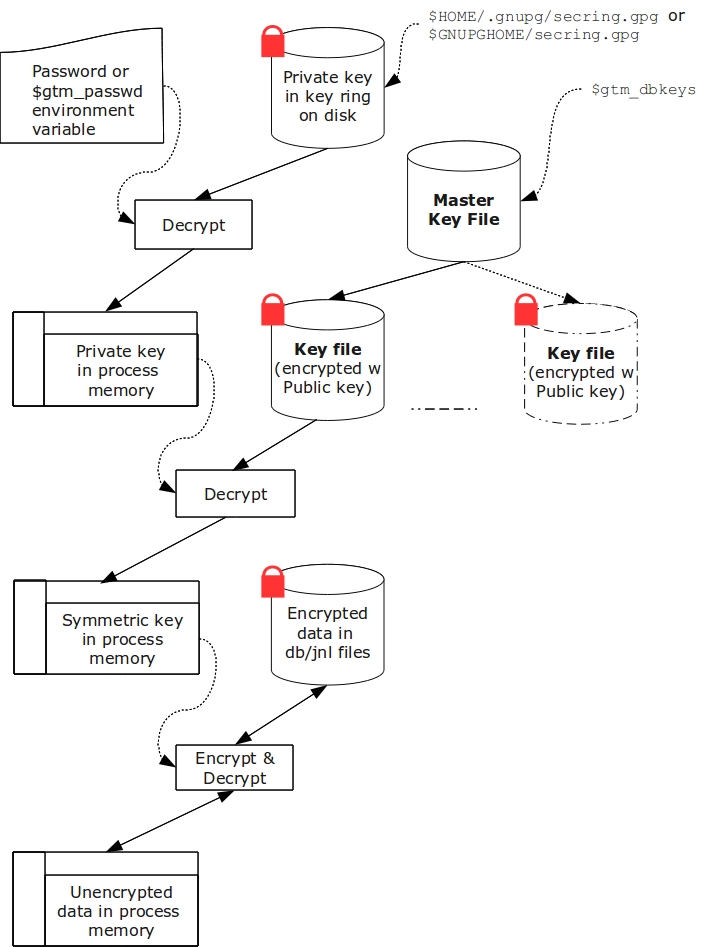
Key Ring on Disk
In the reference implementation, a password protected key ring on disk contains the private key of the asymmetric cipher. A password is required to access the key ring on disk and obtain the private key. Password acquisition happens in one of three ways:
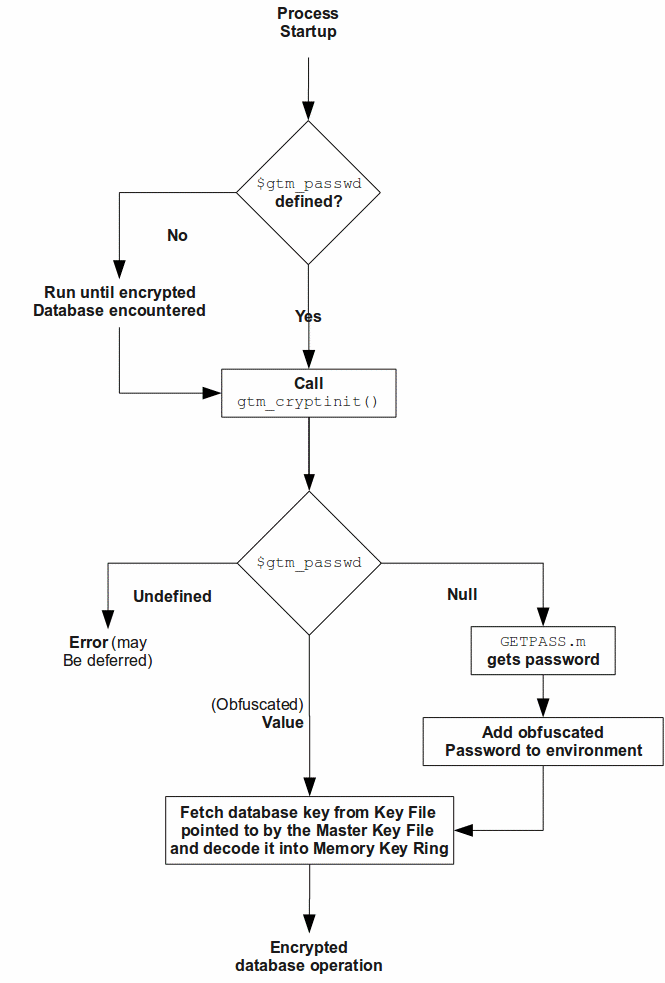
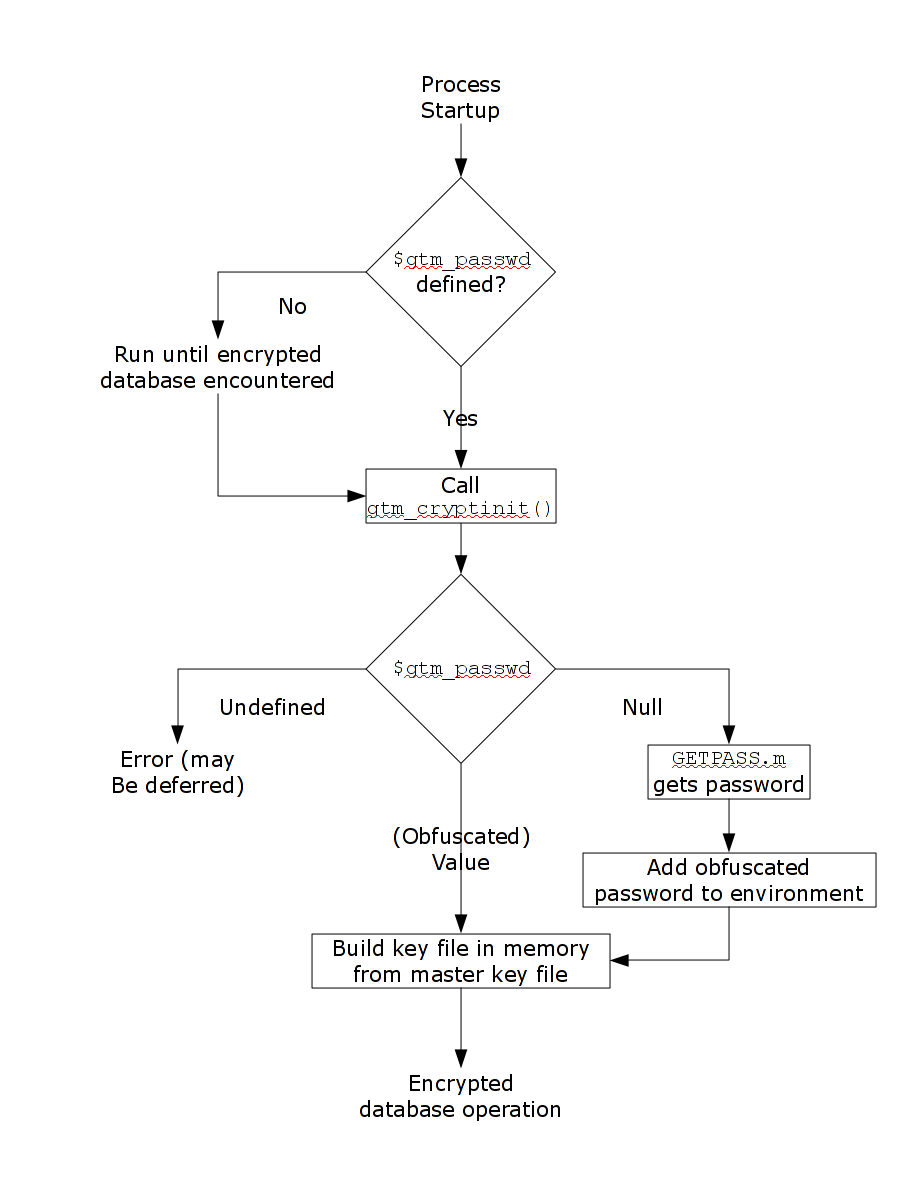
- When the environment variable $gtm_passwd is not set, before a GT.M mumps process needs to open an encrypted database file, the application calls a program such as GETPASS.m to prompt for and obtain a password for the key ring on disk.
- When the environment variable $gtm_passwd is set to the null string, at process startup, GT.M implicitly calls the program GETPASS.m to prompt for and obtain a password. The environment variable, $gtm_passwd is then set to an obfuscated version of the password required to unlock the key ring on disk.
- The environment variable $gtm_passwd contains an obfuscated version of the password required to unlock the key ring on disk to obtain the private key. The environment variable can be passed in to GT.M, or it can be prompted for and set, as described below.
Some graphical user interfaces, e.g., GNOME or KDE, may detect when you are being prompted for the GPG keyring password and use a graphical interface instead of the terminal interface. You may be able to disable this behavior if you unset the $DISPLAY environment variable, or use an ssh connection to localhost that disables X forwarding. Consult your graphical user interface documentation.
In order to enable the Job command, the password for the key ring on disk exists in the environment of the process in environment variable $gtm_passwd where it can be passed from a parent process to a child. In order to prevent inadvertent disclosure of the password, for example, in a dump of the environment submitted to FIS for product support purposes, the password in the environment is obfuscated using information available to processes on the system on which the process is running, but not available on other systems.
$gtm_passwd is the only way for a child process to receive a password from a parent. In the event that the parent process does not pass $gtm_passwd to the child, or passes an incorrect password, there is little a child without access to an input device can do except log an error and terminate.
An obfuscated password in the environment is the only way that other GT.M processes (MUPIP and DSE) can be provided with a password. If they encounter an encrypted database or journal file, and do not have an obfuscated password to the key ring on disk in the environment, they terminate with the error message “GTM-E-CRYPTINIT, Error initializing encryption library. Environment variable gtm_passwd set to empty string. Password prompting not allowed for utilities” . There are (at least) two ways to provide MUPIP and DSE processes with obfuscated passwords in $gtm_passwd:
maskpass is a stand-alone program that prompts the user for the password to the key ring on disk, and returns an obfuscated password to which $gtm_passwd can be set. The environment variable $gtm_passwd should be not set, set to a null value, or set to a value produced by maskpass. Setting $gtm_passwd to an incorrect non-null value without using maskpass could result in undefined behavior of the encryption library. You can use maskpass in shell scripts. For example:
$ echo -n “Enter Password: “;export gtm_passwd=
$gtm\_dist/plugin/gtmcrypt/maskpass|cut -f 3 -d " "Enter Password:
$
Create a one line GT.M program as follows:
zcmd ZSYstem $ZCMdline Quit
and use it invoke the MUPIP or DSE command. For example:
$ gtm_passwd=”” mumps -run zcmd mupip backup -region "*"
The empty string value of $gtm_passwd causes the MUMPS process to prompt for and set an obfuscated password in its environment which it then passes to the MUPIP program. Shell quote processing requires the use of escapes to pass the quotes from the ZSYstem command to the shell.
The environment variable $gtm_passwd should be one of the following:
- not set
- set to a null value
- set to a value corresponding to an obfuscated password (e.g., produced by maskpass)
The following schematic illustrates acquisition of the password for the key ring on disk. Note that an error (for example from the entry of an incorrect password) may not be triggered immediately – for example, DSE does not need an encryption key until you attempt to access data (since the file header is not encrypted, access to it does not require a key).
Master Key File and Key Files
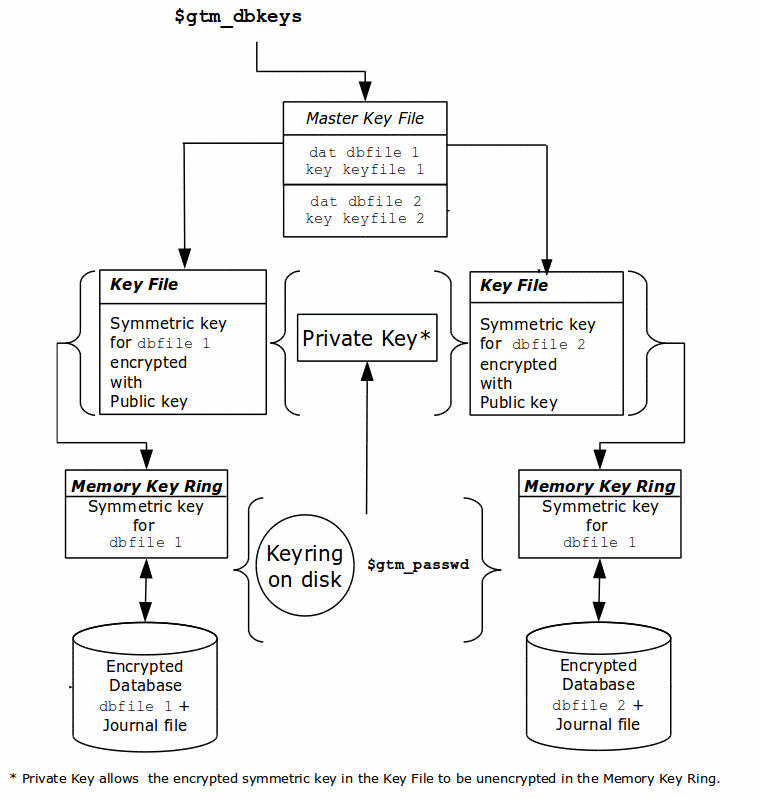
The reference implementation uses a master key file for each user to obtain the symmetric keys for each database or journal file. The environment variable $gtm_dbkeys specifies the master key file. If $gtm_dbkeys points to a file, it is the master key file. If it points to a directory, the file .gtm_dbkeys in that directory is the master key file (that is: $gtm_dbkeys/.gtm_dbkeys). If the environment variable is not defined, the functions look for a key file ~/.gtm_dbkeys (i.e., in the home directory of the process’ userid). The master key file contains sections as follows:
dat database_filename
key key_filename
where database_filename is the name of a database file, for example, /var/xyzapp/gbls/accounts.dat and key_filename is the name of a key file containing a symmetric key encrypted with a public key, for example: /home/sylvia/dbkeys/accounts.key.
Key files are text files which can even be faxed or e-mailed: since they are secured with asymmetric encryption, you can transmit them over an insecure channel. As discussed below, the same database_filename can occur multiple times in a master key file.
Memory Key Ring
For each key_filename, the GT.M process (MUMPS, MUPIP or DSE) builds a memory key ring from the key ring on disk and the master key file. The memory key ring contains a list of elements where each element consists of a filename, a symmetric cipher key, and a cryptographic hash of that symmetric cipher key. Using the private key obtained from the key ring on disk, GT.M obtains the symmetric keys from key files pointed to by the master key file.
Database and journal file headers include a cryptographic hash of the encryption key and algorithm used for that file. When opening a file, GT.M uses the key in the memory key ring whose hash matches that in the header – the database_filename in the key ring is ignored. Older keys need not be deleted until they are no longer required (for example, an older key may be required to access a restored backup copy of a database). Permitting the same database_filename to occur multiple times in a master key file also enables one master key file to be used for multiple instances of an application. This ensures that the correct key for a file is always used, even if the file has been renamed, copied from another location, etc. – the correct key must of course be available in the memory key ring; if no such key exists, GT.M triggers a CRYPTKEYFETCHFAILED error.
Only for MUPIP CREATE does GT.M rely on the database_filename in the key ring. MUPIP CREATE computes the cryptographic hash for the correct key to place in the database file header. If the same database_filename occurs more than once in the master key file (and hence in the memory key ring), MUPIP CREATE uses the key_filename associated with the last occurrence of that database_filename in the master key file.
This is illustrated by the picture below.
Key Validation and Hashing
As discussed earlier, a process uses that key in its memory key ring whose hash matches the hash in the database or journal file header; the file name is not checked. MUPIP CREATE computes the hash value for the key at database creation time, and writes it to the database file header. When GT.M creates a new journal file for an encrypted database file, it copies the hash from the database file header into the journal file header. Similarly, MUPIP EXTRACT -FORMAT=BINARY, places the database file hash in the extract, which is encrypted; indeed, since an extract can come from multiple database files, extract places the hash from the file header of each encrypted database in the extract. When processing each section in the extract, MUPIP LOAD uses that key in its memory key ring that matches the hash for each section of the extract.
Database Operation
On disk, database and journal files are always encrypted – GT.M never writes unencrypted data to an encrypted database or journal file. GT.M uses decryption when reading data records from disk, and encryption when it writes data records to disk.
With encrypted databases, the number of global buffers allocated is automatically doubled, for example, if the database file header specifies 2000 global buffers, when the file is opened, GT.M automatically allocates 4000 global buffers. Global buffers are used in pairs: one global buffer has a copy of the encrypted database block as it exists on disk and the other has a copy of the unencrypted version. There is no change to the size of the control structures (including lock space and journal buffers) in shared memory. So, when using encrypted databases, you need to adjust your calculations of memory and shared memory usage accordingly: for each open database file, the shared memory usage will increase by the number of global buffers times the block size. For example, if the block size of a database file is 4KB, with 2048 global buffers, and the shared memory segment for that database file occupies 9MB when unencrypted, it occupies 17MB when the file is encrypted. Depending on your operating system you may need to change system configuration and tuning parameters. Other than global buffers, there is no change to memory usage with encryption.
Encrypted databases consume additional CPU resources for encryption and decryption. Without detailed knowledge of the chosen algorithms, the application patterns and hardware configuration, it is not possible to predict whether this will be appreciable, and whether application throughput will be affected. As far as possible, FIS has attempted to engineer GT.M database encryption so that the additional CPU resources are consumed outside software critical sections. The intention is to minimize the impact of encryption on application throughput, at least on computer systems that are not starved of CPU resources. You should determine the actual impact of encryption on your application when it runs on your system, preferably using a test environment that exactly reflects your production environment.
Examples of use
The commands here are all line oriented to illustrate that they can be automated by being called from GT.M or from a shell script. For interactive use, there are many graphical user interfaces (GUIs) usable with GPG. Although these examples were generated on Linux, usage on other UNIX systems should be virtually identical.
Key Management
This is an example of key management using GPG and the reference implementation.
Helen Keymaster (helen@gt.m) is the master of keys, and provides a database key to Phil Keyuser (phil@gt.m). Helen does not manage the database. Phil is the database manager, but he is not the master of keys.
In order to communicate securely, Helen and Phil each set up a GPG keyring, generate a public / private key pair, and exchange & authenticate each other’s public keys. This permits a secure transfer of the key for the symmetric cipher used for the database.
Warning: If you attempt key generation on a virtual machine, or other computer system that does not have a good supply of entropy, the gen_key_pair.sh script could take a very, very long time. Similarly, a key quality of 2 for the gen_sym_key.sh script on a machine without a plentiful supply of entropy can also tax your patience. Use a physical computer system with a lot of entropy. If you are able to, use an entropy gathering daemon such as egd (http://egd.sourceforge.net), or consider acquiring an entropy source such as the Entropy Key (http://www.entropykey.co.uk) that you can use to distribute entropy to your virtual machines.
The workflow is as follows:
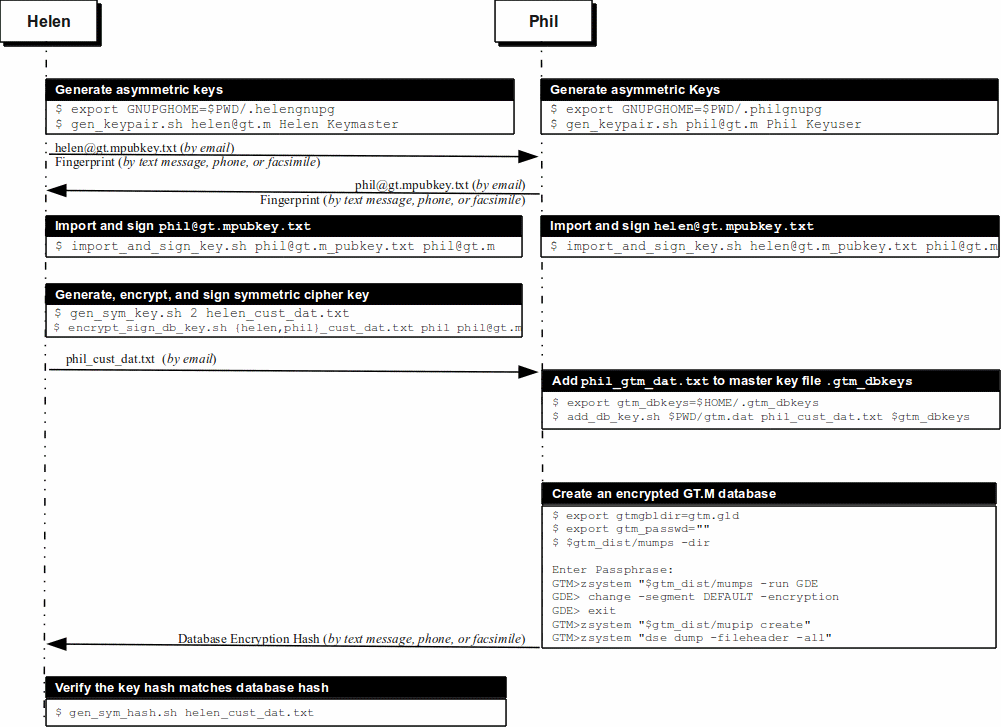
Helen and Phil each create a new GPG keyring and a new public-private key pair.3 In the gen_keypair.sh script GPG generates the key pair,4 putting public and private keys in the key ring; the latter locked with a passphrase. The public key is also exported to a text file, and its fingerprint is displayed in the terminal session. Each of them e-mails (or otherwise sends) her/his public key text file to the other.5 This is illustrated below; first Helen, then Phil (if the GNUPGHOME environment variable is not set, it will default to $HOME/.gnupg).
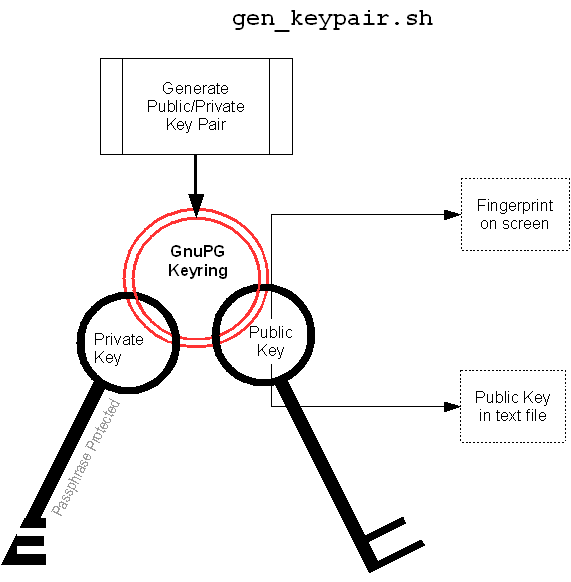
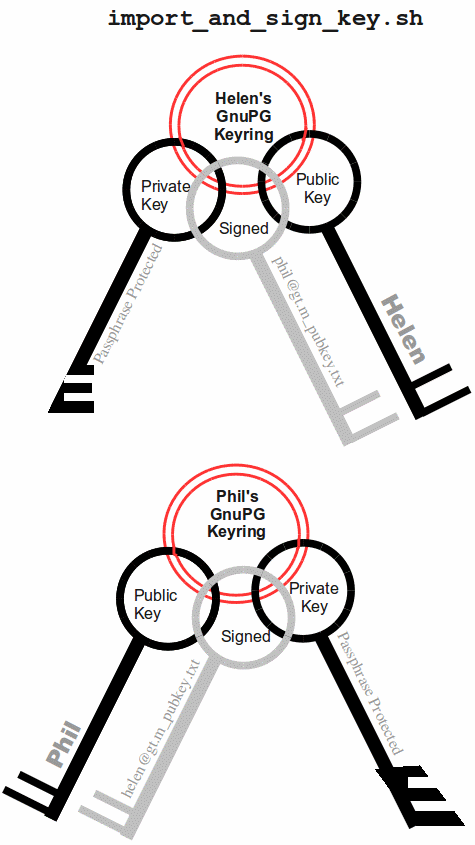
Helen e-mails helen@gt.m_pubkey.txt the file containing her exported public key to Phil, and Phil sends phil@gt.m_pubkey.txt, his exported public key to Helen. To protect against “man in the middle” attacks, they speak on the phone to exchange keyfingerprints, or send each other the fingerprints by text message,or facsimile - a different communication channel than that used to exchange the keys. Phil does likewise with Helen’s key. They use the import_and_sign_key.sh shell script. After importing and signing each other’s public keys, Phil and Helen can communicate securely with each other, even in the presence of eavesdroppers. Helen’s keyring with Phil’s imported key is shown below.
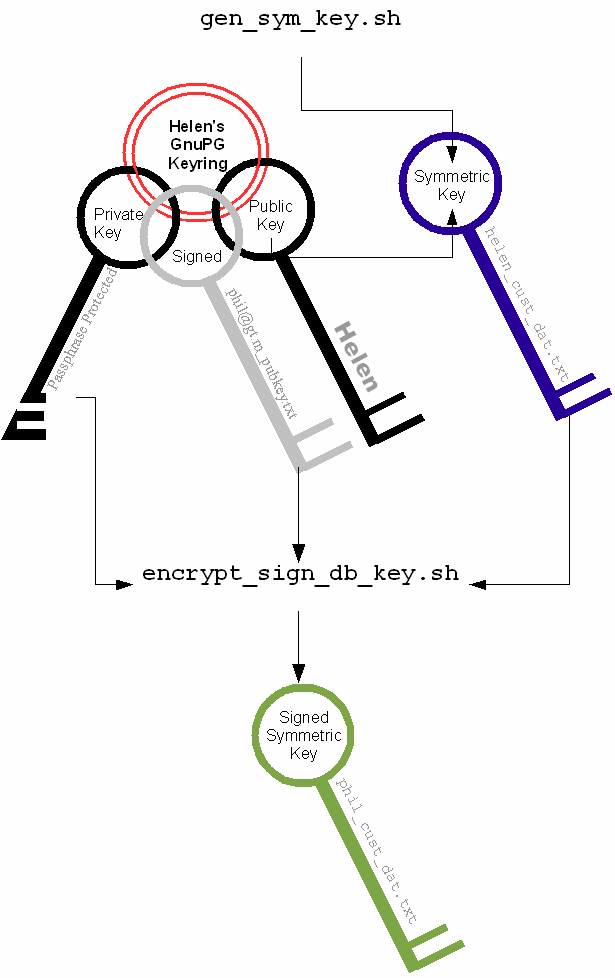
Using the gen_sym_key.sh script, Helen generates a symmetric cipher key for Phil to use in encrypting a new database file cust.dat. With a key strength of 2, a symmetric key is suitable for use in production and in the example is stored in file helen_cust_dat.txt encrypted with Helen’s public key so that only she can decrypt it. The gen_sym_key.sh script never displays the symmetric cipher key; the key in the text file on disk can only be decrypted with Helen’s private key.
With the encrypt_sign_db_key.sh script, Helen uses her private key to decrypt the symmetric cipher key in helen_cust_dat.txt, encrypts it with Phi’s public key, and signs it with her private key, creating a file called phil_cust_dat.txt. She sends this file to Phil, either as an e-mail attachment, or putting it in a mutually agreed upon location on disk. As before, even though the key is on disk, it can be decrypted only with Phil’s private key. Note that from this point on, even if Helen is hit by a truck, or resigns, Phil has access to the key and can use the same encrypt_sign_db_key.sh script to provide the key to, say, Xavier, Helen’s successor. Helen preparing the key for Phil is shown below.
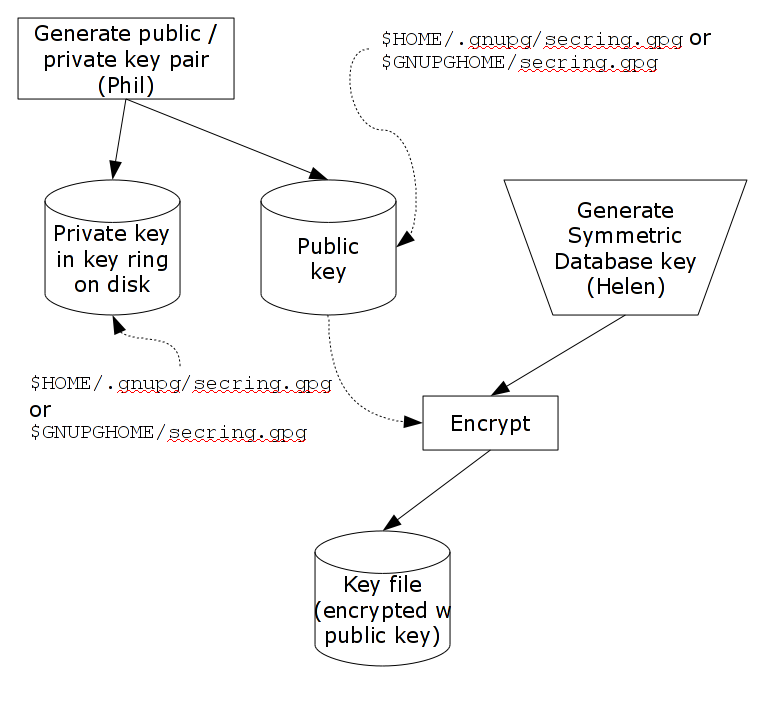
With the add_db_key.sh script, Phil now adds the key to his GT.M master key file. He can then create the encrypted database file with mupip create, load it with data and use it. Until the database is created and loaded with data, the key has no value and can be discarded at will. Once the database is created and loaded with the data, the key must be retained as long as access to the database - or even a backup thereof - is ever required. The entire process is illustrated below:
- As a final check to make sure that the database was created with the correct symmetric cipher key and the correct cipher, Helen can use the gen_sym_hash.sh script to compute a hash from the key in helen_cust_dat.txt while Phil uses GT.M’s dse dump -fileheader -all command to print the key from the file header of the database file he creates. If the hashes match, the database file has been correctly created.
Below are scripts of the key management example above.
Helen creates a new GPG keyring with a public and private key pair:
helen$ export GNUPGHOME=$PWD/.helengnupg
helen$ $gtm_dist/plugin/gtmcrypt/gen_keypair.sh helen@gt.m Helen Keymaster
Passphrase for new keyring:
Verify passphrase:
Key ring will be created in /home/helen/.helengnupg
Key generation might take some time. Do something that will create entropy, like moving the mouse or typing in another session.
gpg: checking the trustdb
gpg: 3 marginal(s) needed, 1 complete(s) needed, PGP trust model
gpg: depth: 0 valid: 1 signed: 0 trust: 0-, 0q, 0n, 0m, 0f, 1u
/home/helen/.helengnupg/pubring.gpg
pub 1024D/BC4D0739 2010-05-07
Key fingerprint = B38B 2427 5921 FFFA 5278 8A91 1F90 4A46 BC4D 0739
uid Helen Keymaster helen@gt.m
sub 2048R/A2E8A8E8 2010-05-07
Key pair created and public key exported in ASCII to helen@gt.m_pubkey.txt
helen$
Phil creates a new GPG keyring with a public and private key pair:
phil$ export GNUPGHOME=$PWD/.philgnupg
phil$ $gtm_dist/plugin/gtmcrypt/gen_keypair.sh phil@gt.m Phil Keyuser
Passphrase for new keyring:
Verify passphrase:
Key ring will be created in /home/phil/.philgnupg
Key generation might take some time. Do something that will create entropy, like moving the mouse or typing in another session.
gpg: checking the trustdb
gpg: 3 marginal(s) needed, 1 complete(s) needed, PGP trust model
gpg: depth: 0 valid: 1 signed: 0 trust: 0-, 0q, 0n, 0m, 0f, 1u
/home/phil/.philgnupg/pubring.gpg
pub 1024D/A5719A99 2010-05-07
Key fingerprint = 886A BAFC E156 A9AD 7EA9 06EA 8B8B 9FAC A571 9A99
uid Phil Keyuser phil@gt.m
sub 2048R/AD37D5A0 2010-05-07
Key pair created and public key exported in ASCII to phil@gt.m_pubkey.txt
phil$
Then Helen sends Phil the file helen@gt.m_pubkey.txt and Phil sends Helen the file phil@gt.m_pubkey.txt.
Helen imports Phil’s public key into her keyring, verifying the fingerprint when she imports it, and signing it to confirm that she has verified the fingerprint:
helen$ $gtm_dist/plugin/gtmcrypt/import_and_sign_key.sh phil@gt.m_pubkey.txt phil@gt.m
gpg: key A5719A99: public key “Phil Keyuser phil@gt.m” imported
gpg: Total number processed: 1
gpg: imported: 1
#########################################################
pub 1024D/A5719A99 2010-05-07
Key fingerprint = 886A BAFC E156 A9AD 7EA9 06EA 8B8B 9FAC A571 9A99
uid Phil Keyuser phil@gt.m
sub 2048R/AD37D5A0 2010-05-07
#########################################################
Please confirm validity of the fingerprint above (y/n/[?]): y
Passphrase for keyring:
Successfully signed public key for phil@gt.m received in phil@gt.m_pubkey.txt
helen$
Phil likewise imports, verifies and sign’s Helen’s public key:
phil$ $gtm_dist/plugin/gtmcrypt/import_and_sign_key.sh helen@gt.m_pubkey.txt helen@gt.m
gpg: key BC4D0739: public key “Helen Keymaster helen@gt.m” imported
gpg: Total number processed: 1
gpg: imported: 1
#########################################################
pub 1024D/BC4D0739 2010-05-07
Key fingerprint = B38B 2427 5921 FFFA 5278 8A91 1F90 4A46 BC4D 0739 uid Helen Keymaster helen@gt.m
sub 2048R/A2E8A8E8 2010-05-07
#########################################################
Please confirm validity of the fingerprint above (y/n/[?]): y
Passphrase for keyring:
Successfully signed public key for helen@gt.m received in helen@gt.m_pubkey.txt
phil$
Helen and Phil can now securely exchange information.
Helen generates a symmetric cipher key for the new database file cust.dat:
helen$ $gtm_dist/plugin/gtmcrypt/gen_sym_key.sh 2 helen_cust_dat.txt
helen$
Then she encrypts the symmetric cipher key with Phil’s public key, signs it, and produces a file phil_cust_dat.txt that she can send Phil:
helen$ $gtm_dist/plugin/gtmcrypt/encrypt_sign_db_key.sh helen_cust_dat.txt phil_cust_dat.txt phil@gt.m
Passphrase for keyring:
gpg: checking the trustdb
gpg: 3 marginal(s) needed, 1 complete(s) needed, PGP trust model
gpg: depth: 0 valid: 1 signed: 1 trust: 0-, 0q, 0n, 0m, 0f, 1u
gpg: depth: 1 valid: 1 signed: 0 trust: 1-, 0q, 0n, 0m, 0f, 0u
helen$
Phil adds the key in phil_cust_dat.txt to his master key file $HOME/.gtm_dbkeys:
phil$ export gtm_dbkeys=$HOME/.gtm_dbkeys
phil$ $gtm_dist/plugin/gtmcrypt/add_db_key.sh $PWD/gtm.dat phil_cust_dat.txt $gtm_dbkeys
phil$
Phil creates a global directory, where he changes the configuration parameter for the database file cust.dat specifying that it be encrypted the next time it is created. (Remember that except for mapping from global variable names to database file names, configuration parameters in the global directory are used only when MUPIP creates new database files.) He then creates the database file, runs a DSE dump fileheader to extract the hash (highlighted in the output), and sends it to Helen for verification (notice that MUPIP CREATE generates an error for the mumps.dat file that exists already, but creates a new encrypted cust.dat file):
phil$ export gtmgbldir=gtm.gld
phil$ export gtm_passwd=""
phil$ $gtm_dist/mumps -dir
Enter Passphrase:
GTM>zsystem “$gtm_dist/mumps -run GDE”
%GDE-I-LOADGD, Loading Global Directory file
/var/myApp/databases/gtm.gld
%GDE-I-VERIFY, Verification OK
GDE> change -segment DEFAULT -encryption
GDE> exit
%GDE-I-VERIFY, Verification OK
%GDE-I-GDUPDATE, Updating Global Directory file
/var/myApp/databases/gtm.gld
- GTM>zsystem “$gtm_dist/mupip create”
- Created file /var/myApp/databases/gtm.dat
- Error opening file /var/myMpp/databases/mumps.dat
File exists
%GTM-F-DBNOCRE, Not all specified database files, or their associated journal files were created
GTM>zsystem “dse”
File /var/myApp/databases/cust.dat
Region CUST
DSE> dump -fileheader -all
File /var/myApp/databases/cust.dat
Region CUST
Date/Time 04-MAY-2010 11:24:10 [$H = 61850,41050]
Access method BG Global Buffers 1024
Reserved Bytes 0 Block size (in bytes) 1024
Maximum record size 256 Starting VBN 129
Maximum key size 64 Total blocks 0x00000065
Null subscripts NEVER Free blocks 0x00000062
Standard Null Collation FALSE Free space 0x00000000
Last Record Backup 0x0000000000000001 Extension Count 100
Last Database Backup 0x0000000000000001 Number of local maps 1
Last Bytestream Backup 0x0000000000000001 Lock space 0x00000028
In critical section 0x00000000 Timers pending 0
Cache freeze id 0x00000000 Flush timer 00:00:01:00
Freeze match 0x00000000 Flush trigger 960
Current transaction 0x0000000000000001 No. of writes/flush 7
Maximum TN 0xFFFFFFFFE3FFFFFF Certified for Upgrade to V5
Maximum TN Warn 0xFFFFFFFF73FFFFFF Desired DB Format V5
Master Bitmap Size 112 Blocks to Upgrade 0x00000000
Create in progress FALSE Modified cache blocks 0
Reference count 1 Wait Disk 0
Journal State DISABLED
Mutex Hard Spin Count 128 Mutex Sleep Spin Count 128
Mutex Spin Sleep Time 2048 KILLs in progress 0
Replication State OFF Region Seqno 0x0000000000000001
Zqgblmod Seqno 0x0000000000000000 Zqgblmod Trans 0x0000000000000000
Endian Format LITTLE Commit Wait Spin Count 16
Database file encrypted TRUE
Dualsite Resync Seqno 0x0000000000000001 DB Current Minor Version 8
Blks Last Record Backup 0x00000000 Last GT.M Minor Version 8
Blks Last Stream Backup 0x00000000 DB Creation Version V5
Blks Last Comprehensive Backup 0x00000000 DB Creation Minor Version 8
Total Global Buffers 0x00000400 Phase2 commit pid count 0x00000000
Dirty Global Buffers 0x00000000 Write cache timer count 0xFFFFFFFF
Free Global Buffers 0x00000400 wcs_wtstart pid count 0x00000000
Write Cache is Blocked FALSE wcs_wtstart intent cnt 0x00000000
Actual kills in progress 0 Abandoned Kills 0
Process(es) inhibiting KILLs 0
DB Trigger cycle of ^#t 0
MM defer_time 0
Database file encryption hash 12D119C93E28BBA9389C6A7FD53C2373CFF7181DF48FEF213523B7B38199EF18B4BADB232D30CBDA2DBFC5F85D97D7A5C4A3E3D13276DCBB63B30EBDAA6B5DD7
Full Block Writes OFF Full Block Write Len 0
TP blkmod nomod 0
TP blkmod gvcst_srch 0
TP blkmod t_qread 0
TP blkmod tp_tend 0
TP blkmod tp_hist 0
Free blocks 992 Backup blocks 0
Reformat blocks 0 Total blocks 992
Shmpool blocked FALSE File Offset 0x0000000000000000
Shmpool crit holder 0 Backup_errno 0
Backup Process ID 0 Backup TN 0x0000000000000000
Inc Backup TN 0x0000000000000000 Process Failed 0
Allocs since check 0 Backup Image Count 0
Temp File:
Database is Fully Upgraded : TRUE
Database WAS ONCE Fully Upgraded from V4 : TRUE
Blocks to Upgrade subzero(negative) error : 0x00000000
TN when Blocks to Upgrade last became 0 : 0x0000000000000000
TN when Desired DB Format last changed : 0x0000000000000000
TN when REORG upgrd/dwngrd changed dbfmt : 0x0000000000000000
Block Number REORG upgrd/dwngrd will restart from : 0x00000000
Upd reserved area [% global buffers] 50 Avg blks read per 100 records 200
Pre read trigger factor [% upd rsrvd] 50 Upd writer trigger [%flshTrgr] 33
Snapshot in progress FALSE Number of active snapshots 0
Snapshot cycle 0 Active snapshot PID 0
Snapshot TN 0 Total blocks 0
Free blocks 0 Process failed 0
Failure errno 0 Snapshot shared memory identifier -1
Snapshot file name
DSE> exit
GTM>halt
$
Phil calls Helen with the hash, texts her mobile, or sends e-mail. Helen ensures that the hash of the key she generated matches the hash of the database file created by Phil, and communicates her approval to Phil. Phil can now use the database. Either Phil or Helen can provide the key to other users who are authorized to access the database and with whom they have securely exchanged keys.
helen$ $gtm_dist/plugin/gtmcrypt/gen_sym_hash.sh helen_cust_dat.txt
Passphrase for keyring:
gpg: encrypted with 2048-bit RSA key, ID A2E8A8E8, created 2010-05-07
“Helen Keymaster helen@gt.m”
178E55E32DAD6BFF761BF917412EF31904C8FC9CEF283A26DFCD5E7138F1924C30B8A179F20E3E57ABB055A7150CD5B35B046A676EC7245C07228B5B1A9A4202
helen$
The encrypted database file cust.dat is now ready for use. That file, all journal files, backups, and binary extracts will all have the same symmetric encryption cipher and key, which means that software libraries that provide that cipher and copies of the key (encrypted with the public keys of all those who are authorized to access them) must be retained as long as there may be any need to access data in that database file, its journal files, extracts and backups.
The following command sequence diagram illustrates how Helen and Phil operate with one another.
Tested Reference Implementations
GT.M database encryption comes with a reference implementation that should work “out of the box” with selected encryption packages. You can use this for your initial development and testing with GT.M database encryption. There are many encryption packages. As discussed earlier, FIS neither endorses nor supports any specific cipher or package. For your production use, you take responsibility for choosing, implementing and procuring support for your preferred package. Please remember that a malfunction in your chosen encryption package may result in unrecoverable data and FIS will be unable to help you.
The Plugin Architecture and Interface section below details the reference implementation, which is provided with full source code that you can freely modify for your own use.
For each platform on which GT.M supports encryption, the following table lists the encryption packages and versions against which FIS tested GT.M. Note that FIS tested GT.M for operation against these packages; FIS did not test the robustness of the encryption packages themselves.
| OS (HW) | libgpgme | libgpg-error | libgcrypt / libcrypto | GPG |
|---|---|---|---|---|
| Ubuntu 10.04 LTS (x86_64) | 1.2.0-1.2 | 1.6-1 | libgcrypt 1.4.4-5 | 1.4.10-2 |
| RHEL 5.4 (x86_64) | 1.1.6 | 1.4-2 | libgcrypt 1.4.4-5 | 1.4.5 |
| RHEL 5.5 (x86) | 1.1.6 | 1.4-2 | libgcrypt 1.4.4-5 | 1.4.5 |
| RHEL 5.3 (IA64) | 1.1.6 | 1.4-2 | libgcrypt 1.4.4-5 | 1.4.5 |
| z/OS (zSeries) | 1.1.8 | 1.7 | libgcrypt 1.4.4 | 1.4.9 |
| AIX 5.3 (pSeries) | 1.1.8 + fix | 1.7 | libcrypto from openssl 0.9.8k | 1.4.9 |
| Solaris 9 and 10 (SPARC) | 1.1.4 + fix | 1.6 | libgcrypt 1.4.1 | 1.4.9 |
| HP-UX 11.31 (IA64) | 1.1.8 + fix | 1.7 | libgcrypt 1.4.1 | 1.4.9 |
| SLES 11 (x86_64) | 1.1.6-25.30 | 1.6-8.6 | libgcrypt 1.4.4-2.2 | 2.0.9-25.25.1 |
| SLES 11 (s390x) | 1.1.6-25.30 | 1.6-8.6 | libgcrypt 1.4.1-6.7 | 2.0.9-25.25.1 |
| SLES 10 (s390x) | 1.0.3-16.2 | 1.0-16.2 | libgcrypt 1.2.2-13.2 | 1.4.9-6.1 |
Where the table lists a package version number followed by “+ fix” it means that in the process of testing, we identified issues with the package that we fixed. We have provided the source code for our fixes to the upstream package maintainers. If you have a support agreement with FIS, we will share that source code with you, upon request.
The reference implementation uses:
- The key ring on disk implemented by GPG.
- For public key encryption including the generation of public/private key pairs: RSA as implemented by GPG.
- For the cryptographic hash: SHA-512.
- For a programmatic interface to GPG: libgpgme.
- To provide error messages for GPG: libgpg-error.
- For symmetric encryption: AES 256 CFB implemented by libgcrypt on all platforms except AIX; Blowfish CFB implemented by libcrypto on AIX.
The reference implementation for AIX differs from other platforms because of certain limitations in libgcrypt as of the date of the initial release of GT.M database encryption as a consequence of the port of libgcrypt to the 64-bit environment being less mature than its port to the 32-bit environment (GT.M on AIX is a 64-bit application). Also, Blowfish is used because the implementation of AES on libcrypto from openssl requires data to be in chunks that are multiples of 16 bytes. It is possible that these limitations may no longer be an issue at such time when you consider AES on libgcrypt for your use. Nevertheless it serves to demonstrate that the plug-in architecture works with two different libraries. Note: this means that database files encrypted by the reference implementation are incompatible between AIX and other UNIX platforms.
The sample shell scripts in the reference implementation use the standard shell (/bin/sh).
- During development, in a core dump, FIS noticed a decrypted symmetric database key in buffer released by libgpgme despite the fact that GT.M made an appropriate call to the library to destroy the key. We have communicated this to the upstream developers. This emphasizes again the desirability of strong random numbers as database keys as well as the disabling of core dumps except when required. These strong keys can be created using the gen_sym_key.sh script described in the “Key Management” section.
Special note - Gnu Privacy Guard version 2
For the most part GPG version 2 is upward compatible with GPG version 1. An important difference between the two is that when GPG v2 invoked via GPGME (such as for example with a JOB command or a command such as ZSYSTEM “mupip create”), there is not a convenient way to avoid invoking an “agent” (by default in /usr/bin/pinentry) that obtains the passphrase for the keyring from the user. When the reference implementation has placed an obfuscated password in the environment, the password should be derived from that obfuscated password, and the user should not be prompted for the password. The solution is to create a GT.M pinentry function (packaged in pinentry-gtm.sh and pinentry.m).
When the gen_keypair.sh script is executed, it creates a file gpg-agent.conf in the GnuPG directory (~/.gnupg or specified by the environment variable $GNUPGHOME) with the line such as pinentry-program /usr/lib/fis-gtm/V5.4-000_x86/plugin/gtmcrypt/pinetry-gtm.sh which causes /usr/lib/fis-gtm/V5.4-000_x86/plugin/gtmcrypt/pinetry-gtm.sh to be invoked by GnuPG v2 as the pinentry program. If the script finds the environment variable $gtm_passwd to be set, and as well as an executable GT.M, it runs the pinentry.m program which provides GnuPG v2 with the keyring password from the obfuscated password. Otherwise, it calls /usr/bin/pinentry.
If you are using GnuPG v2 with a .gnupg directory not created by gen_keypair.sh, you should create a gpg-agent.conf as described here, substituting the directory where GT.M is actually installed.
The GT.M pinentry function should not be used while changing the keyring passphrase, e.g., the passwd subcommand of the gpg –edit-key command. One way to do this is to temporarily comment out the the pinentry-program line in gpg-agent.conf by placing a “#” in front of the line, e.g.:
#/usr/lib/fis-gtm/V5.4-000_x86/plugin/gtmcrypt/pinetry-gtm.sh
Installation
The normal GT.M installation script (invoked by sh ./configure executed as root or with sudo sh ./configure in the directory in which you have unpacked the GT.M distribution) will automatically install GT.M with the reference implementation plug-in.
If the encryption libraries are not part of the automatic search path on your system, you will need to take action specific to your operating system and directory structure to make them accessible. For example, you may need to set one of the environment variables $LD_LIBRARY_PATH or $LIBPATH, for example: export LIBPATH="/lib:/usr/lib:/usr/local/lib" and/or run the ldconfig command.
You must also implement appropriate key management, including ensuring that users have appropriate values for $gtm_dbkeys.
The $gtm_dist/plugin directory is configured such that you can copy it to a location of your choice to customize your own encryption plug-in. After testing, simply replace the directory as distributed with your customized directory.
Administration and Operation of Encrypted Databases
Utility programs written in M (such as %GO) run within mumps processes and behave like any other code written in M. Encryption keys are required if the mumps process accesses encrypted databases. A process running a utility program written in M that does not access encrypted databases (such as %RSEL) does not need encryption keys just to run the utility program.
Utility programs not written in M (e.g., MUPIP) that need access to encryption keys do not prompt for the password to the key ring on disk. They require the obfuscated password to be available in the environment. You can use the maskpass program to set the password in the environment or a mumps wrapper process as discussed earlier to set the obfuscated password in the environment. In some cases, if a required key is not supplied, or if an incorrect key is specified, the utility program defers reporting the error at process start up in case subsequent actions don’t require access to encrypted data, and instead reports it when first attempting an encryption or decryption operation.
Since they do not access application data at rest, the GDE and LKE uitlities do not need access to encryption keys to operate with encrypted databases.
MUPIP and DSE use the same plug-in architecture as mumps processes – gtmcrypt_init() to acquire keys, gtmcrypt_encode() to encode, etc.
Changes to Utility Programs
GDE
Since the global directory file is never encrypted, GDE does not need access to encryption keys.
Format / Upgrade
The need to support encryption brings an upgrade to the global directory format, whether or not you use encryption. Simply opening an existing global directory with GDE and closing the program with an EXIT command upgrades the global directory.
- FIS strongly recommends you make a copy of any global directory before upgrading it. There is no way to downgrade a global directory – you need to recreate it.
If you inadvertently upgrade a global directory to the new format and wish to recreate the old global directory, execute the SHOW ALL command with the new GT.M release and capture the output. Use the information in the SHOW ALL command to create a new global directory file with the prior GT.M release, or better yet, create a script that you can feed to GDE to create a new global directory.
New functionality
-[NO]ENcryption is now a SEGMENT qualifier. When creating the database file for a segment that is flagged as encrypted, MUPIP CREATE acquires an encryption key for that file, and puts a cryptographic hash of the key in the database file header.
MUPIP
Except for the following commands where it does not need encryption keys to operate on encrypted databases, MUPIP needs access to encryption keys to operate on encrypted databases: BACKUP -BYTESTREAM, EXIT, EXTEND, FTOK, HELP, INTRPT, REPLICATE, RUNDOWN, STOP. MUPIP looks for the password for the key ring on disk in the environment variable $gtm_passwd, terminating with an error if it is unable to get a matching key for any database, journal, backup or extract file that contains encrypted data.
Note:
- MUPIP JOURNAL operations that only operate on the journal file without requiring access to the database - EXTRACT and SHOW - require only the key for the journal file, not the current database file key.
- MUPIP SET operations that require stand-alone access to the database do not need encryption keys; any command that can operate with concurrent access to the database requires encryption keys.
- All other MUPIP operations require access to database encryption keys.
- MUPIP EXTRACT -FORMAT=ZWRITE or -FORMAT=GLO and MUPIP JOURNAL -EXTRACT are intended to produce readable database content, and produce cleartext output even when database and journal files are encrypted.
- Since a MUPIP EXTRACT -FORMAT=BINARY extract file can contain encrypted data from multiple database files, the extract file contains the hashes for all database files from which extracted data was obtained.
- An encrypted database cannot be downgraded to GT.M version 4 (V4) format.
MUPIP CREATE
MUPIP CREATE is the only command that uses the database_filename in the master key file to obtain the key from the corresponding key_filename. As discussed elsewhere, all other commands use the key from the key ring in memory that matches the cryptographic hash for the encrypted data. If there are multiple files with the same file name, MUPIP CREATE uses the key specified in the last database_filename entry with that name in the master key file.
MUPIP JOURNAL
The MUPIP JOURNAL -SHOW command now displays the cryptographic hash of the symmetric key stored in the journal file header (the output is one long line):
$ mupip journal -show -backward mumps.mjl 2>&1 | grep hash
Journal file hash F226703EC502E9757848EEC733E1C3CABE5AC146C60F922D0E7D7CB5E2A37ABA005CE98D908B219249A0464F5BB622B72F5FDA0FDF04C8ECE52A4261975B89A2
$
MUPIP LOAD
Since an extract may contain the cryptographic hashes of multiple database files from which the data has been extracted, MUPIP LOAD may require multiple keys even to load one database file. Additionally, the database file into which the data is being loaded may have a different key from any data in the extract.
DSE
Unless you are acting under the specific instructions of FIS GT.M support, please provide DSE with access to encryption keys by setting the value of $gtm_passwd in the environment.
DSE operations that operate on the file header (such as CHANGE -FILEHEADER) do not need access to database encryption keys, whereas DSE operations that access data blocks (such as DUMP -BLOCK) usually require access to encryption keys. However, all DSE operations potentially require access to encryption keys because if DSE is the last process to exit a database, it will need to flush dirty global buffers, for which it will need the encryption keys. DSE does not encrypt block dumps. There is a current misfeature, that access to the database key is needed to look at block 0 (a bitmap). In practical usage this is not a severe restriction since typically when a bitmap is examined data records are also examined (which require the key anyway).
Please remember that DSE is a low level utility for use by knowledgeable users, and does not check for reasonableness of commands and values.
The DSE DUMP -FILEHEADER -ALL command shows the database file header, including the encryption hash (the hash is a very long line):
$ dse dump -fileheader -all 2>&1 | grep hash
Database file encryption hash F226703EC502E9757848EEC733E1C3CABE5AC146C60F922D0E7D7CB5E2A37ABA005CE98D908B219249A0464F5BB622B72F5FDA0FDF04C8ECE52A4261975B89A2
$
Changing the hash in the database file header
Under normal operating conditions, you should not need to change the cryptographic hash of the symmetric key. However, since there are theoretical attacks against hashes, and because a new cryptographic hash standard (SHA-3) is under development as of this date, DSE provides the ability to change the hash of the password stored in the database file header if and when you change the hash library.
The DSE CHANGE -FILEHEADER -ENCRYPTION_HASH function hashes the symmetric key in the key file and replaces the hash in the database file header with this new value. The procedure to change the hash is:
- With the old hash function linked to your plug-in, ensure that the database is structurally sound with a MUPIP INTEG. Although changing the hash in the file header makes no change to any data block, you will have more confidence in your work, and easier troubleshooting in the event of subsequent problems, if you verify database wholesomeness before proceeding.
- Switch the plug-in to use the new hash function.
- Execute the DSE CHANGE -FILEHEADER -ENCRYPTION_HASH operation.
- Since recovery is not possible with a prior generation journal file with a different hash, if the database is journaled, create a new journal file without a back-pointer using the MUPIP SET -JOURNAL -NOPREVJNL command. FIS suggests backing up the database at this time.
- Verify the correctness of the new hash function by reading a global node or with a DSE DUMP -BLOCK command.
As there is no way to change the hash in a journal file header, make sure that you retain access to the hash packages used for any journal file as long as you want the data in old journal files to be accessible. These old journal files with different hashes cannot be used for database recovery. The data in them can, however, be accessed with a MUPIP JOURNAL -EXTRACT command by a MUPIP process using the old hash function.
Changing Encryption Keys
The only way to change the encryption key of a database file is to extract the data and load it into a new database file created with a different key. Use a logical multi site (LMS) application configuration to change keys while keeping the application available. For example, if A is initially the initiating (primary) instance and B the replicating (secondary) instance:
- Bring down instance B and change the database keys with EXTRACT and LOAD. Remember to save the journal sequence numbers in the original database files, and to set the journal sequence number in all the newly created database files to the largest number in any original database file.
- Bring up instance B and let it catch up with A.
- At a convenient time, switchover. Now application logic executes on B and A is the replicating instance.
- Bring down instance A and change the database keys with either EXTRACT / LOAD or using a backup from B. Then bring it back up and let it catch up.
- To restore the original operating configuration, switchover at a convenient time. Now A again executes application logic which is replicated to B.
FIS suggests using different encryption keys for different instances, so that if the keys for one instance are compromised, the application can be kept available from another instance whose keys are not compromised, while changing the encryption keys on the instance with compromised keys.
Database Creation
Just as there is no way to change the encryption key of a database file, it is not possible to turn on encryption for an unencrypted database file, or to turn it off for an encrypted database file. Once a database file is created, its encryption attributes are immutable. To create an encrypted database, use GDE to specify encryption in the global directory file. Then use MUPIP CREATE to create an encrypted database and MUPIP LOAD to load data into it.
Plugin Architecture & Interface
As noted in the section Tested Reference Implementations, GT.M includes a reference implementation that uses widely available encryption packages. It is your choice: you can decide to use the packages that FIS tested GT.M against, or you can choose to interface GT.M to another package of your choice. As noted earlier, FIS neither recommends nor supports any specific package (not even those that we test against) and you should ensure that you have confidence in and support for whichever package that you intend to use in production. The reference implementation is provided compiled as ready to run object code as well as source code that you can customize to meet your needs.
Building the reference implementation from source code requires standard development tools for your platform, including C compiler, make, ld, standard header files, header files for encryption libraries, etc.
This section discusses the architecture of and interface between GT.M and the plugin. You must ensure that any plugin you provide presents the same interface to GT.M as the reference implementation.
Packaging
The reference implementation by default resides in $gtm_dist/plugin/gtmcrypt.
The reference implementation includes:
A $gtm_dist/plugin/gtmcrypt sub-directory with all source files and scripts. The scripts include those needed to build/install libgtmcrypt.so and “helper” scripts, for example, add_db_key.sh (see below).
The plugin interface that GT.M expects is defined in gtmcrypt_interface.h. Never modify this file - it defines the interface that the plugin must provide.
$gtm_dist/plugin/libgtmcrypt.so6 is the shared library containing the executables which is dynamically linked by GT.M and which in turn calls the encryption packages. If the $gtm_dist/utf8 directory exists, then it should contain a symbolic link to ../plugin.
Source code is provided in the file $gtm_dist/plugin/gtmcrypt/source.tar which includes build.sh and install.sh scripts to respectively compile and install libgtmcrypt.so from the source code.
Extensions to the GT.M External Interface
GT.M now provides additional C structure types (in the gtmxc_types.h file):
- gtmcrypt_key_t – a datatype that is a handle to a key. The GT.M database engine itself does not manipulate keys. The plug-in keeps the keys, and provides handles to keys that the GT.M database engine uses to refer to keys.
- xc_fileid_ptr_t – a pointer to a structure maintained by GT.M to uniquely identify a file. Note that a file may have multiple names – not only as a consequence of absolute and relative path names, but also because of symbolic links and also because a file system can be mounted at more than one place in the file name hierarchy. GT.M needs to be able to uniquely identify files.
Although not required to be used by a customized plugin implementation, GT.M provides (and the reference implementation uses) the following functions for uniquely identifying files:
- xc_status_t gtm_filename_to_id(xc_string_t *filename, xc_fileid_ptr_t *fileid) – function that takes a file name and provides the file id structure for that file.
- xc_status_t gtm_is_file_identical(xc_fileid_ptr_t fileid1, xc_fileid_ptr_t fileid2) – function that determines whether two file ids map to the same file.
- gtm_xcfileid_free(xc_fileid_ptr_t fileid) – function to release a file id structure.
Operation
Mumps, MUPIP and DSE processes dynamically link to the plugin interface functions that reside in the shared library. The functions serve as software “shims” to interface with an encryption library such as libmcrypt or libgpgme / libgcrypt.
The plugin interface functions are:
- gtmcrypt_init()
- gtmcrypt_getkey_by_name()
- gtmcrypt_getkey_by_hash()
- gtmcrypt_hash_gen()
- gtmcrypt_encode()
- gtmcrypt_decode()
- gtmcrypt_close()
- and gtmcrypt_strerror()
A GT.M database consists of multiple database files, each of which has its own encryption key, although you can use the same key for multiple files. Thus, the gtmcrypt* functions are capable of managing multiple keys for multiple database files. Prototypes for these functions are in gtmcrypt_interface.h.
The core plugin interface functions, all of which return a value of type xc_status_t are:
- gtmcrypt_init() performs initialization. If the environment variable $gtm_passwd exists and has an empty string value, GT.M calls gtmcrypt_init() before the first M program is loaded; otherwise it calls gtmcrypt_init() when it attempts the first operation on an encrypted database file.
- Generally, gtmcrypt_getkey_by_hash or, for MUPIP CREATE, gtmcrypt_getkey_by_name perform key acquisition, and place the keys where gtmcrypt_decode() and gtmcrypt_encode() can find them when they are called.
- Whenever GT.M needs to decode a block of bytes, it calls gtmcrypt_decode() to decode the encrypted data. At the level at which GT.M database encryption operates, it does not matter what the data is – numeric data, string data whether in M or UTF-8 mode and whether or not modified by a collation algorithm. Encryption and decryption simply operate on a series of bytes.
- Whenever GT.M needs to encode a block of bytes, it calls gtmcrypt_encode() to encode the data.
- If encryption has been used (if gtmcrypt_init() was previously called and returned success), GT.M calls gtmcrypt_close() at process exit and before generating a core file. gtmcrypt_close() must erase keys in memory to ensure that no cleartext keys are visible in the core file.
More detailed descriptions follow.
- gtmcrypt_key_t *gtmcrypt_getkey_by_name(xc_string_t *filename) - MUPIP CREATE uses this function to get the key for a database file. This function searches for the given filename in the memory key ring and returns a handle to its symmetric cipher key. If there is more than one entry for the given filename , the reference implementation returns the entry matching the last occurrence of that filename in the master key file.
- xc_status_t gtmcrypt_hash_gen(gtmcrypt_key_t *key, xc_string_t *hash) - MUPIP CREATE uses this function to generate a hash from the key then copies that hash into the database file header. The first parameter is a handle to the key and the second parameter points to 256 byte buffer. In the event the hash algorithm used provides hashes smaller than 256 bytes, gtmcrypt_hash_gen() must fill any unused space in the 256 byte buffer with zeros.
- gtmcrypt_key_t *gtmcrypt_getkey_by_hash(xc_string_t *hash) - GT.M uses this function at database file open time to obtain the correct key using its hash from the database file header. This function searches for the given hash in the memory key ring and returns a handle to the matching symmetric cipher key. MUPIP LOAD, MUPIP RESTORE, MUPIP EXTRACT, MUPIP JOURNAL and MUPIP BACKUP -BYTESTREAM all use this to find keys corresponding to the current or prior databases from which the files they use for input were derived.
- xc_status_t gtmcrypt_encode(gtmcrypt_key_t *key, xc_string_t *inbuf, xc_string_t *outbuf) and xc_status_t gtmcrypt_decode(gtmcrypt_key_t *key, xc_string_t *inbuf, xc_string_t *outbuf)- GT.M uses these functions to encode and decode data. The first parameter is a handle to the symmetric cipher key, the second a pointer to the block of data to encode or decode, and the third a pointer to the resulting block of encoded or decoded data. Using the appropriate key (same key for a symmetric cipher), gtmcrypt_decode() must be able to decode any data buffer encoded by gtmcrypt_encode(), otherwise the encrypted data is rendered unrecoverable.7 As discussed earlier, GT.M requires the encrypted and cleartext versions of a string to have the same length.
- char *gtmcrypt_strerror() - GT.M uses this function to retrieve addtional error context from the plug-in after the plug-in returns an error status. This function returns a pointer to additional text related to the last error that occurred. GT.M displays this text as part of an error report. In a case where an error has no additional context or description, this function returns a null string.
The complete source code for reference implementations of these functions is provided, licensed under the same terms as GT.M. You are at liberty to modify them to suit your specific GT.M database encryption needs. Check your GT.M license if you wish to consider redistributing your changes to others.
Messages
Messages common to MUMPS, MUPIP and DSE
CRYPTDLNOOPEN, Error loading encryption library. xxxx
Run Time Error: GT.M failed to load the gtmcrypt plug-in or one of its related libraries.
Action: Refer to the accompanying detail (xxxx) and verify that the gtmcrypt plug-in and related libraries are properly installed and that $LD_LIBRARY_PATH / $LIBPATH are properly set.
CRYPTHASHGENFAILED, Error generating encryption hash. xxxx
Run Time Error: gtmcrypt plug-in reports there is problem with the hash function.
Action: Examine the message (xxxx) from the plug-in and take the needed action.
CRYPTINIT, Error initializing encryption library. xxxx
Run Time Error: The gtmcrypt plug-in reports it is unable to initialize one or more of its related libraries.
Action: Examine the detailed message (xxxx) from the plug-in and take appropriate action.
CRYPTJNLWRONGHASH, Encryption key hash mismatch between journal file jjjj and corresponding database file dddd
Run Time Error: gtmcrypt plug-in reports the hash of the key in the header of database file dddd does not match the hash stored in the header of journal file jjjj. This is most likely caused by inappropriate operator action such as replacing the current journal file with an older journal file.
Action: Correct the error that caused the incorrect journal file to be pointed to by the database file. If the correct journal file has been inadvertently deleted, create new journal files with the -noprevjnl switch. Take a backup as soon as possible thereafter. Depending on your situation, you may need to refresh secondary instances.
CRYPTKEYFETCHFAILED, Cannot obtain encryption key for ffff. xxxx
Run Time Error: gtmcrypt plug-in reports it was unable to obtain an encryption key for file ffff.
Action: Examine the message (xxxx) from the plug-in and take the needed action to allow the proces to locate the correct key for the file. For example, with the reference implementation, verify that
- the GPG key ring is in the standard location or is pointed to by the GNUPGHOME environment variable and that the key ring is not corrupt;
- the master key file is pointed to by the $gtm_dbkeys environment variable;
- an entry in the master key file exists for this file (ffff);
- the key file pointed to by an entry in the master key file is not corrupt and contains the key for this file;
- the hash in the database file is correct;
- the system/user limits allow for the creation of additional processes (libgpgme forks processes);
- proper permissions exist on the directory paths and files for the database key file, encrypted database key file, and the gpg key ring
- the libraries in use match those used when the file was created and/or last successfully used.
CRYPTKEYFETCHFAILEDNF, Cannot obtain encryption key. xxxx
Run Time Error: gtmcrypt plug-in reports it was unable to obtain an encryption key based upon matching the hash of an encryption key.
Action: See the actions for CRYPTKEYFETCHFAILED.
CRYPTNOMM, ffff is an encrypted database. Cannot support MM access method.
MUPIP or GDE error: This error is triggered by an attempt to mark an MM database as encrypted with GDE or to switch an encrypted database from BG to MM with MUPIP SET. The MM access method is not supported for encrypted databases.
Action: Use the BG access method for encrypted files.
CRYPTNOPSWDINTP, Cannot prompt for password inside a TP transaction.
Run-time error: This error occurs if an external call was used to set the $gtm_passwd environment variable to the null string after starting GT.M and before the first time an encrypted database file is accessed is within a TP transaction.
Action: If possible, set $gtm_passwd to the obfuscated password. Otherwise, ensure that any TP transactions have been closed before setting $gtm_passwd to the null string. Once that is done, immediately touch a global from an encrypted database, e.g., $DATA(^someglobal), to ensure the prompting happens before entering another TP transaction.
- Note: with the reference implementation, it is not considered wholesome programming practice to modify $gtm_passwd for a running process other than to set it to the obfuscated password. FIS neither support this practice nor tests for it and you may encounter unexpected results.
CRYPTNOV4, ffff is an encrypted database. Cannot downgrade(to V4) with Encryption option enabled.>/error/fao=2!/ansi=0
MUPIP error: An attempt to downgrade file ffff which is an encrypted database to the V4 (GT.M version 4) format failed because the V4 format does not support encrypted database files.
Action: Use the database in the current format. If a V4 format is required, extract the data in the (unencrypted) ZWRite format with MUPIP EXTRACT and load it into a newly created V4 database.
CRYPTOPFAILED, Encrypt/Decrypt operation failed. xxxx
Run Time Error: gtmcrypt plug-in reports there is problem with encryption or decryption.
Action: Examine the message (xxxx) from the plug-in and take appropriate action.
Cannot reset encryption hash in file header while ffff other processes are accessing the database
DSE error: DSE detected that there are still processes using the old encryption key
Action: Restart these processes and re run the command to change the encryption hash in the file header
Appendix – Reference Implementation Error messages
These error messages are generated by the reference plug-in. If you change the plug-in, the messages will be those generated by your plug-in. Note that the messages from the plug-in (incorrectly) use the term “DB keys file” for the master key file.
Cannot find DB keys file
Plugin error: The plugin cannot find the master key file.
Action: Set the $gtm_dbkeys environment variable to point to the correct master key file.
Cannot find MUMPS executable in
Plugin error: The plugin cannot find the MUMPS executable.
Action: Set the $gtm_dist environment variable to the directory containing MUMPS executable. Verify proper permissions for directory path and file.
Cannot open DB keys file -
Plugin error: The plugin cannot open the master key file.
Action: Verify the master key file exists and there are appropriate authorizations on the directory path and master key file.
DB keys file of unknown file type :
Plugin error: The plugin reports that the master key file is not the proper type file.
Action: Point the gtm_dbkeys environment variable to an appropriately formatted master key file.
Database file missing in DB keys file or does not exist
Plugin error: The plugin reports that the master key file does not contain a valid entry pointing to the database file.
Action: Create an entry in the master key file for the specified database file, verify that the database file exists and appropriate authorizations exist on the directory and database file name.
Database file not found
Plugin error: The plugin is unable to find the specified database file.
Action: Verify the database file exists, that a corresponding entry in the master key file points to the database file and that appropriate authorizations exist on the directory path and the database file.
Encryption handle corrupted
Plugin error: The plugin detected an internal error.
Action: Indicates there is a communications error between GT.M and the gtmcrypt plug-in. Replace process with undamaged one. Report the entire incident context to your GT.M support channel.
Encryption key file not found
Plugin error: The plugin was not able to find the key file on the specified path.
Action: Verify master key file entry for this key file points to the correct path. Verify that the key file itself exists. Verify proper authorizations on directory path and file.
Encryption library has not been initialized
Plugin error: A gtmcrypt function was called before gtmcrypt_init().
Action: Call gtmcrypt_init() before calling any other encryption functions.
Environment variable <environment_variable> not set
Plugin error: An environment variable needed by the plugin was not set.
Action: Set the environment variable <environment_variable> to its correct value.
Environment variable gtm_dbkeys set to empty string
Plugin error: The $gtm_dbkeys environment variable was set to the empty string.
Recovery Action: Set $gtm_dbkeys to point to the master key file.
Environment variable gtm_dbkeys undefined. Cannot find /.gtm_dbkeys
Plugin error: The plugin was unable to locate the master key file.
Action: Place the master key file in the users home directory or point the gtm_dbkeys environment variable to the master key file.
Environment variable gtm_passwd set to empty string. Password prompting not allowed for utilities
Plugin error: The plugin detected that it needed the obfuscated password but the $gtm_passwd environment variable was set to the empty string.
Action: Use maskpass to set $gtm_passwd to the obfuscated password prior to invoking MUPIP/DSE, or wrap the invocation with a MUMPS process which will prompt for the password and set the obfuscated password.
Error initializing GpgME: <reason_for_error>/<specific_Gpg_ME_error>
Plugin error: libgpgme reported an error to the plugin.
Action: Consult GpgME documentation for the specific error message.
Error parsing database key file. At line <line_number>: No matching ‘dat’ entry found in <contents_of_line>
Plugin error: The plugin was unable to find a matching “dat” entry for a “key” entry in the master key file.
Action: Verify that each “key” entry has a corresponding “dat” entry.
Error parsing database key file. At line <line_number>: <line_contents> does not start with ‘dat’ / ‘key’
Plugin error: The plugin detected that the master key file was not properly formatted.
Action: Verify entries in the master key file start with “dat” or “key”.
Error parsing database key file. At line <line_number>: No matching ‘key’ entry found in <contents_of_line>
Plugin error: The plugin was not able to find a “key” entry for a “dat” entry.
Action: Verify the database file exists, that the corresponding entry in the master key file points to the database file, that appropriate authorizations exist on the directory path and the database file, and that each “dat” entry has a corresponding “key” entry.
Incorrect password
Plugin error: The plugin detected that the correct private key password was not supplied.
Action: Provide the correct password.
libgcrypt version mismatch. or higher is required
Plugin error: The plugin could not locate an appropriate libgcrypt library version.
Action: Verify that libgcrypt version greater than or equal to the specified version is installed and in the library search path.
Matching encryption key not found in database key file
Plugin error: The plugin was not able to find a needed database file key.
Action: Add an entry for this encryption key. If needed, use DSE DUMP –FILE –ALL on all of the database files to find the database file that matches the
No entries found in DB keys file
Plugin error: The plugin was unable to find any entries in the master key file.
Action: Add entries to the master key file.
Symmetric key found to be empty
Plugin error: The plugin was unable to find a valid encrypted key in the specified file.
Action: Create a valid key file.
Appendix – Building Encryption Libraries
FIS neither encourages nor supports the use of any specific encryption library. In order to be helpful, here is how we created the libraries for testing GT.M in the development environment.
Ubuntu 8.04 LTS (x86_64)
Packages were installed from standard repositories using the package manager.
Red Hat Enterprise Linux 5.4 (x86_64)
All packages except libgpgme were installed from Red Hat Network. libgpgme was built from source after specifying ./configure CC=gcc CFLAGS=-m64
Red Hat Enterprise Linux 5.5 (x86)
Packages were installed from standard repositories using the package manager.
Red Hat Enterprise Linux 5.3 (IA64)
All packages except libgpgme were installed from Red Hat Network. libgpgme was built from source after specifying ./configure CC=gcc
IBM z/OS (zSeries)
Warning: The configure scripts for the GnuPG libraries do not generate shared libraries, only static archive libraries. Owing to this limitation, the archive libraries are unpacked and recompiled back into dynamically linked libraries. The following example uses libgpg-error as the target. FIS suggests that you create a temporary directory for each DLL.
- Unpack the archive : ar -x /usr/local/lib/libgpg-error.a
- Link the archive objects into a DLL: xlc -qascii -q64 -W l,DLL -o libgpg-error.dll *.o
- Copy the DLL and side deck file into the destination (assumed to be /usr/local/lib): cp libgpg-error.dll libgpg-error.x /usr/local/lib
GPG-ERROR
Apply the patch libgpg-error-1.7.patch to libgpg-error sources. Then run the configuration and installation steps.
- ./configure CC=xlc CFLAGS="-qchars=signed -qascii -q64 -qlanglvl=extc99 -qexportall -qrent -qnocsect -W l,DLL -D_XOPEN_SOURCE=600 -D_ENHANCED_ASCII_EXT=0xFFFFFFFF -D_IEEEV1_COMPATIBILITY -D_OPEN_MSGQ_EXT" LD=xlc LDFLAGS="-qascii -q64 -W l,DLL" CXX=xlc++ –enable-shared –prefix=/usr/local
- make && make check
- (as root) make install
Follow the instructions above to turn the archive library into a dynamically linked library.
GCRYPT
Apply the patch libgcrypt-1.4.4.patch to the libgcrypt sources. Before running the configure and installation steps, you need to place some symbolic links in the sources. Compiling libgpgcrypt on z/OS runs afoul of a limitation of the XLC compiler’s include header search path and system headers. Issue the following commands, verbatim, to overcome this limitation:
cd mpi
ln -s ../src/mpi.h .
ln -s ../src/memory.h .
cd -
cd cipher
ln -s ../src/mpi.h .
cd -
Then:
- ./configure CC=xlc CFLAGS="-qchars=signed -qascii -q64 -qlanglvl=extc99 -qexportall -qrent -qnocsect -W l,DLL -D_XOPEN_SOURCE=600 -D_ENHANCED_ASCII_EXT=0xFFFFFFFF -D_IEEEV1_COMPATIBILITY
- make && make check
- (as root) make install
Follow the instructions from above to turn the archive library into a dynamically linked library.
GPGME
Apply the patch gpgme-1.1.8.patch to the gpgme sources. Then run the configuration and installation steps.
- ./configure CC=xlc CFLAGS="-qchars=signed -qascii -q64 -qlanglvl=extc99 -qexportall -qrent -qnocsect -W l,DLL -D_XOPEN_SOURCE=600 -D_ENHANCED_ASCII_EXT=0xFFFFFFFF -D_IEEEV1_COMPATIBILITY
- make && make check
- (as root) make install
Follow the instructions from above to turn the archive library into a dynamically linked library.
GNUPG
Apply the patch gnupg-1.4.9.patch to the GnuPG sources. Before running the configure and isntallation steps, you need to place some symbolic links in the sources. Compiling libgpgcrypt on z/OS runs afoul of a limitation of the XLC compiler’s include header search path and system headers. Issue the following commands, verbatim, to overcome this limitation:
cd mpi
ln -s ../include/mpi.h .
ln -s ../include/memory.h .
cd -
Then:
- ./configure CC=xlc CFLAGS="-qchars=signed -qascii -q64 -qlanglvl=extc99 -qexportall -qrent -qnocsect -W l,DLL -D_XOPEN_SOURCE=600 -D_ENHANCED_ASCII_EXT=0xFFFFFFFF -D_IEEEV1_COMPATIBILITY -D_OPEN_MSGQ_EXT" LD=xlc LDFLAGS="-qascii -q64 -W l,DLL" CXX=xlc++ –without-pth –without-libassuan –without-ksba –prefix=/usr/local
- make && make check
- (as root) make install
IBM AIX 5.3 (pSeries)
GPG-ERROR
./configure CC=cc CFLAGS=-q64 ($OBJECT_MODE=64)
CRYPTO (From OpenSSL)
These instructions build OpenSSL which provides libcrypto.
./Configure aix64-cc shared # Note: it is an upper case C
.make
(as root) make install
GPGME
GPGME requires a source level fix to use the proper malloc() that requires an include for stdlib.h in the include section of version.c. Then:
./configure CC=“xlc -q64” –disable-asm ($OBJECT_MODE=64)/ or CC=cc CFLAGS=-q64
GNUPG
GPG on AIX requires the setuid bit to be set. This can be done via chmod u+s /path/to/gpg. Please see http://www.gnupg.org/documentation/faqs.en.html#q6.1
./configure CC=“xlc -q64” –disable-asm ($OBJECT_MODE=64) or CC=cc CFLAGS=-q64
Solaris 9 and 10 (SPARC)
Set $LD_LIBRARY_PATH to include /usr/lib/sparcv9 AND /usr/ucblib/sparcv9 for both Solaris 9 and 10. Solaris seems to default to the 32-bit version of ucblib at runtime, unless the 64-bit path is ahead of the 32-bit in $LD_LIBRARY_PATH. However, using -R/usr/lib/sparcv9 -R/usr/ucblib/sparcv9/ as a CFLAG at build time hard-codes the path into the library, removing the need for $LD_LIBRARY_PATH.
GPG-ERROR
./configure CC=/opt/SUNWspro/bin/cc CFLAGS="-m64 -R/usr/lib/sparcv9 -R/usr/ucblib/sparcv9/"
GCRYPT
./configure CC=/opt/SUNWspro/bin/cc CFLAGS="-m64 -R/usr/lib/sparcv9 -R/usr/ucblib/sparcv9/" –disable-asm –with-gpg-error-prefix=/usr/local
GPGME
GPGME requires a source level fix to use the proper malloc() that requires an include for stdlib.h in the include section of version.c.
./configure CC=“xlc -q64” –disable-asm ($OBJECT_MODE=64)/ or CC=cc CFLAGS=-q64
./configure CC=/opt/SUNWspro/bin/cc CFLAGS="-m64 -R/usr/lib/sparcv9 -R/usr/ucblib/sparcv9/" –disable-asm –with-gpg-error-prefix=/usr/local
GNUPG
./configure CC=/opt/SUNWspro/bin/cc CFLAGS="-m64 -R/usr/lib/sparcv9 -R/usr/ucblib/sparcv9/" –disable-asm
HP-UX 11.31 (IA64)
Depending on which user runs the configure command, you may or may not have to specify the –with-gpg-error-prefix flag.
GPG-ERROR
./configure CC=/usr/bin/cc CFLAGS=+DD64
GCRYPT
./configure CC=/usr/bin/cc CFLAGS=+DD64 –with-gpg-error-prefix=/usr/local
GPGME
GPGME requires a source level fix to use the proper malloc() that requires an include for stdlib.h in the include section of version.c.
./configure CC=/usr/bin/cc CFLAGS=+DD64 –with-gpg-error-prefix=/usr/local
GNUPG
./configure CC=/usr/bin/cc CFLAGS=+DD64 –with-gpg-error-prefix=/usr/local
SUSE Linux Enterprise Server 11 (x86_64)
Packages were installed from standard repositories using the package manager. The libgcrypt packages have been upgraded using openSUSE 11.2 packages.
SUSE Linux Enterprise Server 11 (s390x)
Packages were installed from standard repositories using the package manager.
SUSE Linux Enterprise Server 10 (s390x)
Packages were installed from standard repositories using the package manager.
To uprade the GPG package using the source RPM version 1.4.9-6.1 from openSUSE 11:
- Download and install gpg-1.4.9-6.1 src rpm.
wget ftp://ftp.pbone.net/mirror/ftp5.gwdg.de/pub/opensuse/repositories/home%3A/keutterling/openSUSE_11.0/src/gpg-1.4.9-6.1.src.rpm
sudo rpm -i gpg-1.4.9-6.1.src.rpm - Install the required dependencies for building GPG. You can get those from the official SLES 10 CDs/DVD.
sudo rpm -i db42-4.2.52-20.2.s390x.rpm openssl-devel-0.9.8a-18.36.s390x.rpm cyrus-sasl-devel-2.1.21-18.11.41.s390x.rpm openldap2-2.3.32-0.35.23.s390x.rpm openldap2-devel-2.3.32-0.35.23.s390x.rpm - Build GPG 1.4.9 RPM.
rpmbuild -bb /usr/src/packages/SPECS/gpg1.spec - Upgrade to the new GPG RPM.
sudo rpm -U /usr/src/packages/RPMS/s390x/gpg-1.4.9-6.1.s390x.rpm
Using the V5.4-001 Reference Implementation with Older Releases
Since the interface between GT.M and the encryption libraries is stable, encrypted databases require no special upgrade procedures beyond any that may be required for ordinary databases when upgrading GT.M versions. Beyond an occasional need to recompile the plugin and rebuild the shared library, a plugin other than the reference implementation should also continue to operate with new GT.M versions. This stable interface also means that the encryption plugins from newer GT.M versions can be retrofitted to older GT.M versions. This section describes interfacing the reference plugin bundled with V5.4-001 to an older GT.M version that supports encryption, such as V5.4-000A; adapt it to your needs should you wish to use a plugin from one version of GT.M with another version.
Note: Since the reference plugin bundled with V5.4-001 supports GPG v2 as well as v1, and since its key management is more robust from that bundled with older versions of GT.M that support encryption, FIS suggests that you consider such a retrofit if you have chosen to deploy encrypted databases on older versions of GT.M with the reference implementation.
The instructions provided in this section are expert friendly and intended for someone familiar with UNIX/Linux and GT.M. All commands are examples, rather than intended to be executed as written. Adapt them to your specific needs and DO NOT BLINDLY EXECUTE THEM VERBATIM.
Installation
To obtain the V5.4-001 reference implementation:
- To go the GT.M project website on Source Forge.
- Download the gtmcrypt_V54001.tar.gz file. from the V5.4-001 release of GT.M-x86-Linux-src.
gtmcrypt_V54001.tar.gz contains the source files for the reference plugin distributed with GT.M V5.4-001. (Depending on when you downloaded it, it may have a pre-release version.)
Before you begin:
- Ensure that you have a working C compiler (cc).
- Ensure that you have root access.
- The instructions provided in this section are for installing the V5.4-001 prerelease reference implementation on Ubuntu Linux on an x86_64 system. Other platform should be similar.
To install the new database encryption plug-in on an older GT.M release, perform the following steps:
- Unpack the distribution files in a temporary directory, for example, /tmp/tmp3 and change to the src sub-directory within.
mkdir /tmp/tmp3
tar zxvf gtmcrypt_V54001.tar.gz -C /tmp/tmp3
cd /tmp/tmp3/src - Run the build.sh script specifying the encryption library (gcrypt or openssl) and the build type (d for debug; p for production). The script needs the environment variable $gtm_dist to be defined, and, depending on the way ICU is compiled on your system, may well need $gtm_icu_version to be defined as well.
export gtm_dist=/usr/lib/fis-gtm/V5.4-000A_x86_64
export gtm_icu_version=4.2
./build.sh gcrypt p - As root, make a backup copy of the existing plugin directory.
sudo cp -a $gtm_dist/plugin{,_sav_date +%Y%m%d%H%M%S} - As root, delete the Korn shell scripts and old source tarball in the existing plugin directory.
sudo rm -f $gtm_dist/plugin/gtmcrypt/{*.ksh,source.tar} - As root, run the install script (executing via sudo will not work here, since it does not pass the $gtm_dist environment variable to the shell script).
export gtm_dist=/usr/lib/fis-gtm/V5.4-000A_x86_64
./install.sh - Edit the gpgagent.tab file to specify the correct pathname to the libgtmcrypt.so shared library, and as root, copy the distributed shell scripts and gpgagent.tab file.
cd ..
sudo cp *.sh gpgagent.tab $gtm_dist/plugin/gtmcrypt/ - Set ownership and permissions appropriate to your installation.
sudo chown -R bin.gtm $gtm_dist/plugin
sudo chmod -R o-rwx,a-w $gtm_dist/plugin - Your new database encryption plugin should now be ready for use!
notes
1 In the event core dumps are needed to troubleshoot operational issues, they can always be re-enabled.
2 GT.M provides functions gtm_hiber_start(), gtm_hiber_start_any(), gtm_start_timer(), gtm_cancel_timer(), gtm_jnlpool_detach(), gtm_malloc() and gtm_free() which can be freely used by plug-ins.
3 This step can be omitted if they already have GPG keyrings and public and private keys. However, see the section below on operation with Gnu Privacy Guard version 2.
4 Generatng a public-private keypair can consume a significant amount of the entropy in a computer system. Running out of entropy can cause the operation to stall until sufficient entropy becomes available. You may need to consider external entropy sources or entropy gathering daemons for computer systems on which key generation will occur frequently. For encrypted databases on virtual machines, you may need to generate public-private keypairs on host computers and then ship the keyrings to the virtual guests.
5 One alternative to direct sending of of public keys is to upload them to a keyserver, such as the MIT PGP Public Key Server at http://pgp.mit.edu
6 Different computing platforms may use different file extensions for shared libraries, including .sl and .dll. This document uses .so for readability, but the actual name may vary on your platform.
7 Such a failure in the cipher will likely appear to GT.M as a damaged database.