Examples of use
Examples of use
The commands here are all line oriented to illustrate that they can be automated by being called from GT.M or from a shell script. For interactive use, there are many graphical user interfaces (GUIs) usable with GPG. Although these examples were generated on Linux, usage on other UNIX systems should be virtually identical.
Key Management
This is an example of key management using GPG and the reference implementation.
Helen Keymaster (helen@gt.m) is the master of keys, and provides a database key to Phil Keyuser (phil@gt.m). Helen does not manage the database. Phil is the database manager, but he is not the master of keys.In order to communicate securely, Helen and Phil each set up a GPG keyring, generate a public / private key pair, and exchange & authenticate each other’s public keys. This permits a secure transfer of the key for the symmetric cipher used for the database.Warning: If you attempt key generation on a virtual machine, or other computer system that does not have a good supply of entropy, the gen_key_pair.sh script could take a very, very long time. Similarly, a key quality of 2 for the gen_sym_key.sh script on a machine without a plentiful supply of entropy can also tax your patience. Use a physical computer system with a lot of entropy. If you are able to, use an entropy gathering daemon such as egd (http://egd.sourceforge.net), or consider acquiring an entropy source such as the Entropy Key (http://www.entropykey.co.uk) that you can use to distribute entropy to your virtual machines.
The workflow is as follows:
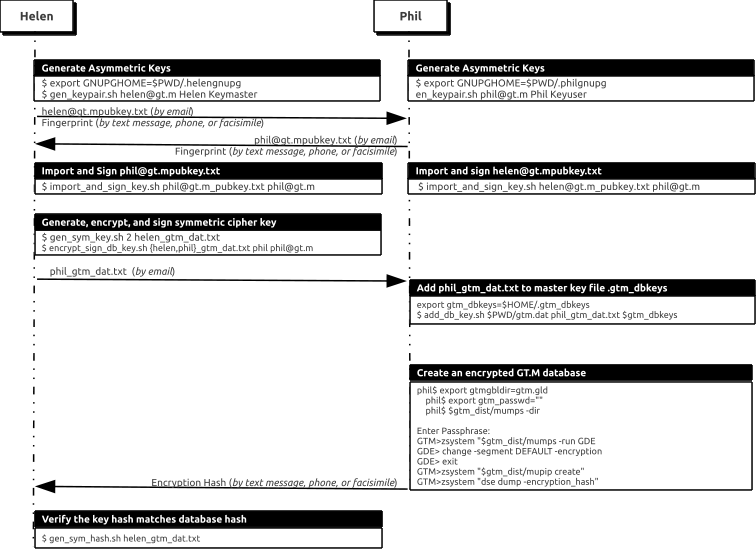
Helen and Phil each create a new GPG keyring and a new public-private key pair[5]. In the gen_keypair.sh script GPG generates the key pair[6], putting public and private keys in the key ring; the latter locked with a passphrase. The public key is also exported to a text file, and its fingerprint is displayed in the terminal session. Each of them e-mails (or otherwise sends) her/his public key text file to the other[7]. This is illustrated below; first Helen, then Phil (if the GNUPGHOME environment variable is not set, it will default to
$HOME/.gnupg).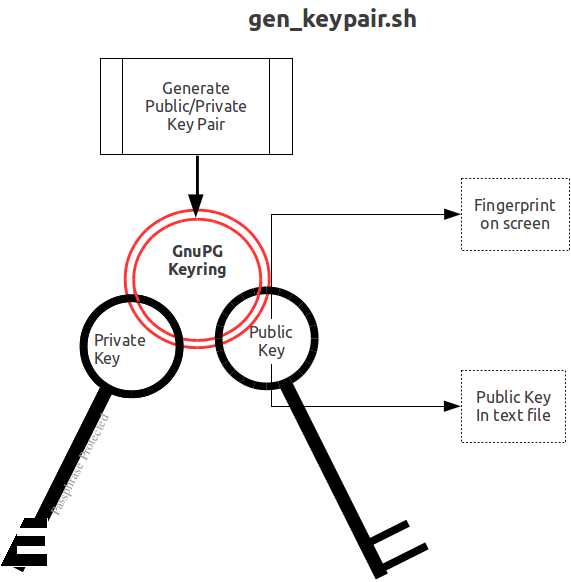
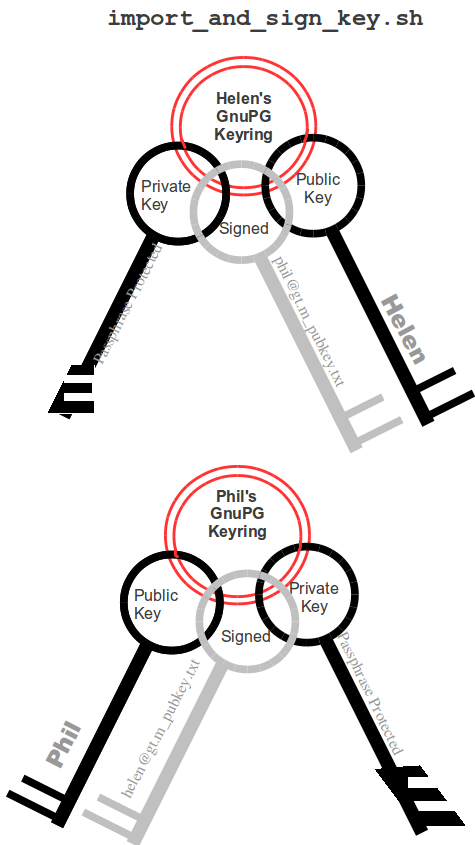
Helen e-mails helen@gt.m_pubkey.txt the file containing her exported public key to Phil, and Phil sends phil@gt.m_pubkey.txt, his exported public key to Helen. To protect against “man in the middle” attacks, they speak on the phone to exchange keyfingerprints, or send each other the fingerprints by text message,or facsimile - a different communication channel than that used to exchange the keys. Phil does likewise with Helen’s key. They use the import_and_sign_key.sh shell script. After importing and signing each other’s public keys, Phil and Helen can communicate securely with each other, even in the presence of eavesdroppers. Helen’s keyring with Phil’s imported key is shown below:
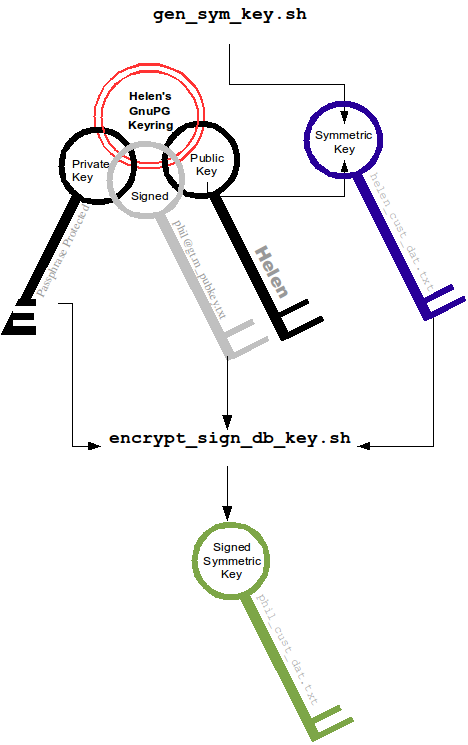
Using the gen_sym_key.sh script, Helen generates a symmetric cipher key for Phil to use in encrypting a new database file cust.dat. With a key strength of 2, a symmetric key is suitable for use in production and in the example is stored in file helen_cust_dat.txt encrypted with Helen’s public key so that only she can decrypt it. The gen_sym_key.sh script never displays the symmetric cipher key; the key in the text file on disk can only be decrypted with Helen’s private key.
With the encrypt_sign_db_key.sh script, Helen uses her private key to decrypt the symmetric cipher key in helen_cust_dat.txt, encrypts it with Phi’s public key, and signs it with her private key, creating a file called phil_cust_dat.txt. She sends this file to Phil, either as an e-mail attachment, or putting it in a mutually agreed upon location on disk. As before, even though the key is on disk, it can be decrypted only with Phil’s private key. Note that from this point on, even if Helen is hit by a truck, or resigns, Phil has access to the key and can use the same encrypt_sign_db_key.sh script to provide the key to, say, Xavier, Helen’s successor. Helen preparing the key for Phil is shown below.
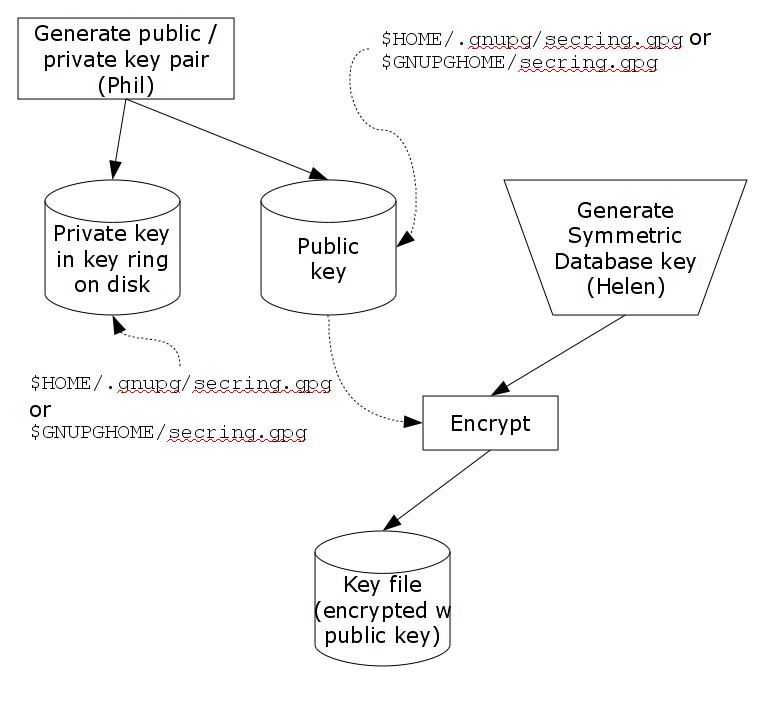
With the add_db_key.sh script, Phil now adds the key to his GT.M master key file. He can then create the encrypted database file with mupip create, load it with data and use it. Until the database is created and loaded with data, the key has no value and can be discarded at will. Once the database is created and loaded with the data, the key must be retained as long as access to the database - or even a backup thereof - is ever required. The entire process is illustrated below:
As a final check to make sure that the database was created with the correct symmetric cipher key and the correct cipher, Helen can use the gen_sym_hash.sh script to compute a hash from the key in helen_cust_dat.txt while Phil uses GT.M’s dse dump -fileheader -all command to print the key from the file header of the database file he creates. If the hashes match, the database file has been correctly created.
Below are scripts of the key management example above.
Helen creates a new GPG keyring with a public and private key pair:
helen$ export GNUPGHOME=$PWD/.helengnupg
helen$ $gtm_dist/plugin/gtmcrypt/gen_keypair.sh helen@gt.m Helen Keymaster
Passphrase for new keyring:
Verify passphrase:
Key ring will be created in /home/helen/.helengnupg
Key generation might take some time. Do something that will create entropy, like moving the mouse or typing in another session.
gpg: checking the trustdb
gpg: 3 marginal(s) needed, 1 complete(s) needed, PGP trust model
gpg: depth: 0 valid: 1 signed: 0 trust: 0-, 0q, 0n, 0m, 0f, 1u
/home/helen/.helengnupg/pubring.gpg
---------------------------------
pub 1024D/BC4D0739 2010-05-07
Key fingerprint = B38B 2427 5921 FFFA 5278 8A91 1F90 4A46 BC4D 0739
uid Helen Keymaster <helen@gt.m>
sub 2048R/A2E8A8E8 2010-05-07
Key pair created and public key exported in ASCII to helen@gt.m_pubkey.txt
helen$
Phil creates a new GPG keyring with a public and private key pair:
phil$ export GNUPGHOME=$PWD/.philgnupg
phil$ $gtm_dist/plugin/gtmcrypt/gen_keypair.sh phil@gt.m Phil Keyuser
Passphrase for new keyring:
Verify passphrase:
Key ring will be created in /home/phil/.philgnupg
Key generation might take some time. Do something that will create entropy, like moving the mouse or typing in another session.
gpg: checking the trustdb
gpg: 3 marginal(s) needed, 1 complete(s) needed, PGP trust model
gpg: depth: 0 valid: 1 signed: 0 trust: 0-, 0q, 0n, 0m, 0f, 1u
/home/phil/.philgnupg/pubring.gpg
---------------------------------
pub 1024D/A5719A99 2010-05-07
Key fingerprint = 886A BAFC E156 A9AD 7EA9 06EA 8B8B 9FAC A571 9A99
uid Phil Keyuser <phil@gt.m>
sub 2048R/AD37D5A0 2010-05-07
Key pair created and public key exported in ASCII to phil@gt.m_pubkey.txt
phil$
Then Helen sends Phil the file helen@gt.m_pubkey.txt and Phil sends Helen the file phil@gt.m_pubkey.txt.
Helen imports Phil’s public key into her keyring, verifying the fingerprint when she imports it, and signing it to confirm that she has verified the fingerprint:
helen$ $gtm_dist/plugin/gtmcrypt/import_and_sign_key.sh phil@gt.m_pubkey.txt phil@gt.m
gpg: key A5719A99: public key "Phil Keyuser <phil@gt.m>" imported
gpg: Total number processed: 1
gpg: imported: 1
#########################################################
pub 1024D/A5719A99 2010-05-07
Key fingerprint = 886A BAFC E156 A9AD 7EA9 06EA 8B8B 9FAC A571 9A99
uid Phil Keyuser <phil@gt.m>
sub 2048R/AD37D5A0 2010-05-07
#########################################################
Please confirm validity of the fingerprint above (y/n/[?]): y
Passphrase for keyring:
Successfully signed public key for phil@gt.m received in phil@gt.m_pubkey.txt
helen$
Phil likewise imports, verifies and sign’s Helen’s public key:
phil$ $gtm_dist/plugin/gtmcrypt/import_and_sign_key.sh helen@gt.m_pubkey.txt helen@gt.m
gpg: key BC4D0739: public key "Helen Keymaster <helen@gt.m>" imported
gpg: Total number processed: 1
gpg: imported: 1
#########################################################
pub 1024D/BC4D0739 2010-05-07
Key fingerprint = B38B 2427 5921 FFFA 5278 8A91 1F90 4A46 BC4D 0739 uid Helen Keymaster <helen@gt.m>
sub 2048R/A2E8A8E8 2010-05-07
#########################################################
Please confirm validity of the fingerprint above (y/n/[?]): y
Passphrase for keyring:
Successfully signed public key for helen@gt.m received in helen@gt.m_pubkey.txt
phil$
Helen and Phil can now securely exchange information.
Helen generates a symmetric cipher key for the new database file cust.dat:
helen$ $gtm_dist/plugin/gtmcrypt/gen_sym_key.sh 2 helen_cust_dat.txt
helen$
Then she encrypts the symmetric cipher key with Phil’s public key, signs it, and produces a file phil_cust_dat.txt that she can send Phil:
helen$ $gtm_dist/plugin/gtmcrypt/encrypt_sign_db_key.sh helen_cust_dat.txt phil_cust_dat.txt phil@gt.m
Passphrase for keyring:
gpg: checking the trustdb
gpg: 3 marginal(s) needed, 1 complete(s) needed, PGP trust model
gpg: depth: 0 valid: 1 signed: 1 trust: 0-, 0q, 0n, 0m, 0f, 1u
gpg: depth: 1 valid: 1 signed: 0 trust: 1-, 0q, 0n, 0m, 0f, 0u
helen$
Phil adds the key in phil_cust_dat.txt to his master key file $HOME/.gtm_dbkeys:
phil$ export gtm_dbkeys=$HOME/.gtm_dbkeysphil$ $gtm_dist/plugin/gtmcrypt/add_db_key.sh $PWD/gtm.dat
phil_cust_dat.txt $gtm_dbkeys
phil$
Phil creates a global directory, where he changes the configuration parameter for the database file cust.dat specifying that it be encrypted the next time it is created. (Remember that except for mapping from global variable names to database file names, configuration parameters in the global directory are used only when MUPIP creates new database files.) He then creates the database file, runs a DSE dump fileheader to extract the hash (highlighted in the output), and sends it to Helen for verification (notice that MUPIP CREATE generates an error for the mumps.dat file that exists already, but creates a new encrypted cust.dat file):
phil$ export gtmgbldir=gtm.gld
phil$ export gtm_passwd=""
phil$ $gtm_dist/mumps -dir
Enter Passphrase:
GTM>zsystem "$gtm_dist/mumps -run GDE"
%GDE-I-LOADGD, Loading Global Directory file
/var/myApp/databases/gtm.gld
%GDE-I-VERIFY, Verification OK
GDE> change -segment DEFAULT -encryption
GDE> exit
%GDE-I-VERIFY, Verification OK
%GDE-I-GDUPDATE, Updating Global Directory file
/var/myApp/databases/gtm.gld
GTM>zsystem "$gtm_dist/mupip create"
Created file /var/myApp/databases/gtm.dat
Error opening file /var/myMpp/databases/mumps.dat
: File exists
%GTM-F-DBNOCRE, Not all specified database files, or their associated journal files were created

GTM>zsystem "dse"

File    /var/myApp/databases/cust.dat
Region  CUST
DSE> dump -fileheader -all

File            /var/myApp/databases/cust.dat
Region          CUST
Date/Time       04-MAY-2010 11:24:10 [$H = 61850,41050]
  Access method                          BG  Global Buffers                1024
  Reserved Bytes                          0  Block size (in bytes)         1024
  Maximum record size                   256  Starting VBN                   129
  Maximum key size                       64  Total blocks            0x00000065
  Null subscripts                     NEVER  Free blocks             0x00000062
  Standard Null Collation             FALSE  Free space              0x00000000
  Last Record Backup     0x0000000000000001  Extension Count                100
  Last Database Backup   0x0000000000000001  Number of local maps             1
  Last Bytestream Backup 0x0000000000000001  Lock space              0x00000028
  In critical section            0x00000000  Timers pending                   0
  Cache freeze id                0x00000000  Flush timer            00:00:01:00
  Freeze match                   0x00000000  Flush trigger                  960
  Current transaction    0x0000000000000001  No. of writes/flush              7
  Maximum TN             0xFFFFFFFFE3FFFFFF  Certified for Upgrade to        V5
  Maximum TN Warn        0xFFFFFFFF73FFFFFF  Desired DB Format               V5
  Master Bitmap Size                    112  Blocks to Upgrade       0x00000000
  Create in progress                  FALSE  Modified cache blocks            0
  Reference count                         1  Wait Disk                        0
  Journal State                    DISABLED
  Mutex Hard Spin Count                 128  Mutex Sleep Spin Count         128
  Mutex Spin Sleep Time                2048  KILLs in progress                0
  Replication State                     OFF  Region Seqno    0x0000000000000001
  Zqgblmod Seqno         0x0000000000000000  Zqgblmod Trans  0x0000000000000000
  Endian Format                      LITTLE  Commit Wait Spin Count          16
  Database file encrypted              TRUE

  Dualsite Resync Seqno  0x0000000000000001  DB Current Minor Version         8
  Blks Last Record Backup        0x00000000  Last GT.M Minor Version          8
  Blks Last Stream Backup        0x00000000  DB Creation Version             V5
  Blks Last Comprehensive Backup 0x00000000  DB Creation Minor Version        8

  Total Global Buffers           0x00000400  Phase2 commit pid count 0x00000000
  Dirty Global Buffers           0x00000000  Write cache timer count 0xFFFFFFFF
  Free  Global Buffers           0x00000400  wcs_wtstart pid count   0x00000000
  Write Cache is Blocked              FALSE  wcs_wtstart intent cnt  0x00000000
  Actual kills in progress                0  Abandoned Kills                  0
  Process(es) inhibiting KILLs            0
  DB Trigger cycle of ^#t                 0

  MM defer_time                           0
  Database file encryption hash  12D119C93E28BBA9389C6A7FD53C2373CFF7181DF48FEF
  213523B7B38199EF18B4BADB232D30CBDA2DBFC5F85D97D7A5C4A3E3D13276DCBB63B30EBDAA6B5
  DD7

  Full Block Writes                     OFF  Full Block Write Len             0


  TP blkmod nomod                  0
  TP blkmod gvcst_srch             0
  TP blkmod t_qread                0
  TP blkmod tp_tend                0
  TP blkmod tp_hist                0

  Free blocks                    992        Backup blocks                    0
  Reformat blocks                  0        Total blocks                   992
  Shmpool blocked              FALSE        File Offset     0x0000000000000000
  Shmpool crit holder              0        Backup_errno                     0
  Backup Process ID                0        Backup TN       0x0000000000000000
  Inc Backup TN   0x0000000000000000        Process Failed                   0
  Allocs since check               0        Backup Image Count               0
  Temp File:

  Database is Fully Upgraded                :  TRUE
  Database WAS ONCE Fully Upgraded from V4  :  TRUE
  Blocks to Upgrade subzero(negative) error : 0x00000000
  TN when Blocks to Upgrade last became 0   : 0x0000000000000000
  TN when Desired DB Format last changed    : 0x0000000000000000
  TN when REORG upgrd/dwngrd changed dbfmt  : 0x0000000000000000

  Block Number REORG upgrd/dwngrd will restart from : 0x00000000

  Upd reserved area [% global buffers]   50  Avg blks read per 100 records  200
  Pre read trigger factor [% upd rsrvd]  50  Upd writer trigger [%flshTrgr]  33

  Snapshot in progress                 FALSE   Number of active snapshots                            0
  Snapshot cycle                            0  Active snapshot PID                                   0
  Snapshot TN                               0  Total blocks                                          0
  Free blocks                               0  Process failed                                        0
  Failure errno                             0  Snapshot shared memory identifier                    -1
  Snapshot file name
DSE> exit

GTM>halt
$
Phil calls Helen with the hash, texts her mobile, or sends e-mail. Helen ensures that the hash of the key she generated matches the hash of the database file created by Phil, and communicates her approval to Phil. Phil can now use the database. Either Phil or Helen can provide the key to other users who are authorized to access the database and with whom they have securely exchanged keys.
helen$ $gtm_dist/plugin/gtmcrypt/gen_sym_hash.sh helen_cust_dat.txt
Passphrase for keyring:gpg: encrypted with 2048-bit RSA key, ID A2E8A8E8, created 2010-05-07"
Helen Keymaster <helen@gt.m>"178E55E32DAD6BFF761BF917412EF31904C...
helen$
The encrypted database file cust.dat is now ready for use. That file, all journal files, backups, and binary extracts will all have the same symmetric encryption cipher and key, which means that software libraries that provide that cipher and copies of the key (encrypted with the public keys of all those who are authorized to access them) must be retained as long as there may be any need to access data in that database file, its journal files, extracts and backups.
The following command sequence diagram illustrates how Helen and Phil operate with one another.
[5] This step can be omitted if they already have GPG keyrings and public and private keys. However, see the section below on operation with Gnu Privacy Guard version 2.
[6] Generatng a public-private keypair can consume a significant amount of the entropy in a computer system. Running out of entropy can cause the operation to stall until sufficient entropy becomes available. You may need to consider external entropy sources or entropy gathering daemons for computer systems on which key generation will occur frequently. For encrypted databases on virtual machines, you may need to generate public-private keypairs on host computers and then ship the keyrings to the virtual guests.
[7] One alternative to direct sending of of public keys is to upload them to a keyserver, such as the MIT PGP Public Key Server at http://pgp.mit.edu